Last Updated on July 25, 2026
Joomla 6 is the latest major release of one of the world’s most popular open-source content management systems (CMS). It brings significant improvements in performance, security, user experience, accessibility, and developer tools. Whether you are upgrading from Joomla 5 or starting a new website, understanding the Joomla 6 features will help you build faster, more secure, and future-ready websites.
This guide explains the most important Joomla 6 features in simple language. We’ll cover everything from the redesigned administration interface to performance improvements and developer enhancements.
Top Joomla 6 Features You Should Know
Joomla 6 focuses on making website management easier while improving speed, stability, and compatibility with modern web technologies.
1. Modern and Improved Administrator Interface
One of the first things you’ll notice after installing Joomla 6 is its cleaner and more user-friendly administrator dashboard. The interface has been refined to help beginners and experienced users work more efficiently.
If you’re planning to explore these Joomla 6 features, it’s best to start with a local development environment. Follow our step-by-step guide on how to install Joomla 6 on localhost using XAMPP before building or testing your website.
Key improvements include:
- Cleaner navigation
- Better dashboard organization
- Improved accessibility
- Faster loading administrator pages
- More consistent user interface
The simplified design reduces clutter and makes managing articles, menus, modules, users, and extensions much easier.
2. Better Performance and Faster Speed
Performance has always been an important part of Joomla development, and Joomla 6 continues this trend.
Some performance improvements include:
- Optimized core code
- Reduced unnecessary database queries
- Faster page rendering
- Improved caching support
- Better asset management
These improvements help websites load faster, improving both user experience and SEO rankings.
If you encounter errors after upgrading or installing extensions, enabling Joomla’s debug mode can help identify the problem. Read our guide on how to enable Debug Mode in Joomla to troubleshoot issues more effectively.
3. Enhanced Security Improvements
Security remains one of the strongest Joomla 6 features.
The latest version includes several security enhancements:
- Updated third-party libraries
- Stronger password handling
- Improved session management
- Latest PHP compatibility
- Regular security patches
Running your website on supported PHP versions also improves overall security and performance.
4. Better Accessibility (WCAG Compliance)
Accessibility is becoming increasingly important for websites worldwide. Joomla 6 includes many improvements that help websites comply with modern accessibility standards.
Benefits include:
- Better keyboard navigation
- Improved screen reader support
- Enhanced form accessibility
- More semantic HTML output
- Improved contrast and usability
This makes Joomla websites more inclusive and easier for everyone to use.
Joomla 6 includes a powerful access control system that allows you to manage users securely. If you’re new to permissions, check out our guide explaining the difference between User Groups and Access Levels in Joomla 6.
5. Full Support for Latest PHP Versions
Joomla 6 fully supports modern PHP versions, helping developers build secure and high-performance websites.
Advantages include:
- Better performance
- Lower memory usage
- Improved security
- Cleaner codebase
- Future compatibility
Using newer PHP versions also allows developers to write more efficient custom extensions.
6. Improved Media Manager
The Media Manager continues to improve in Joomla 6.
You can easily:
- Upload images
- Create folders
- Organize files
- Replace images
- Manage media efficiently
This makes content management much easier for editors and website administrators.
For the latest Joomla 6 releases, announcements, and downloads, always visit the official Joomla website. It provides trusted information about new features, security updates, and community news.
7. Improved Content Editing Experience
Creating articles has become more intuitive in Joomla 6.
Editors can:
- Create content faster
- Insert images easily
- Manage categories
- Use custom fields
- Preview articles before publishing
The streamlined editing workflow saves time when publishing new content.
8. Better Developer Experience
Developers will appreciate many improvements introduced in Joomla 6.
Highlights include:
- Cleaner API structure
- Modern coding standards
- Improved dependency management
- Better extension compatibility
- Enhanced routing system
These updates make extension development easier while improving long-term maintainability.
If you’d like to learn more about the platform or explore advanced topics, the official Joomla Manual offers detailed documentation, installation guides, tutorials, and best practices for users and developers.
9. Improved Extension Compatibility
Many popular Joomla extensions have already been updated to support Joomla 6.
Extension developers benefit from:
- Cleaner APIs
- Better documentation
- Improved plugin events
- Modern architecture
- Enhanced backward compatibility where possible
Always verify that your extensions are Joomla 6 compatible before upgrading.
10. Future-Ready Architecture
Joomla 6 prepares the CMS for future innovations by removing outdated code and adopting modern web development practices.
This includes:
- Cleaner framework integration
- Better dependency injection
- Modern coding standards
- Improved maintainability
- Long-term scalability
This ensures Joomla remains competitive for many years.
Developers creating custom extensions, plugins, or templates can refer to the Joomla API Documentation. It provides comprehensive references for Joomla classes, methods, and coding standards.
Who Should Upgrade to Joomla 6?
You should consider upgrading if:
- Your website already runs on Joomla 5.
- Your extensions support Joomla 6.
- You want better speed.
- You need improved security.
- You want long-term support.
- You are building a new website.
Before upgrading, always create a complete website backup and verify that your template and third-party extensions are compatible.
Benefits of Joomla 6 Features
- Faster websites
- Better SEO performance
- Improved security
- Modern administrator interface
- Better accessibility
- Latest PHP support
- Cleaner development framework
- Improved user experience
- Future-ready CMS
- Easy content management
Since Joomla is an open-source project, its source code is publicly available on the Joomla CMS GitHub repository. Developers can explore the codebase, report issues, or contribute to future releases.
Final Thoughts
The latest Joomla 6 features demonstrate that Joomla continues to evolve into a modern, secure, and high-performance content management system. Whether you’re a website owner, developer, or content editor, Joomla 6 offers noticeable improvements that make website management easier and more efficient.
If you’re planning a new Joomla project, Joomla 6 is an excellent choice. Existing Joomla 5 users should begin preparing for the upgrade by checking extension compatibility and testing their websites in a staging environment.
With its improved speed, stronger security, better accessibility, and developer-friendly architecture, Joomla 6 is ready for the future of web development.
Frequently Asked Questions (FAQs)
Is Joomla 6 free to use?
Yes. Joomla 6 is completely free and open-source under the GNU General Public License (GPL).
Can I upgrade directly from Joomla 5 to Joomla 6?
Yes. Most Joomla 5 websites can upgrade to Joomla 6 after confirming that templates and third-party extensions are compatible.
What are the biggest Joomla 6 features?
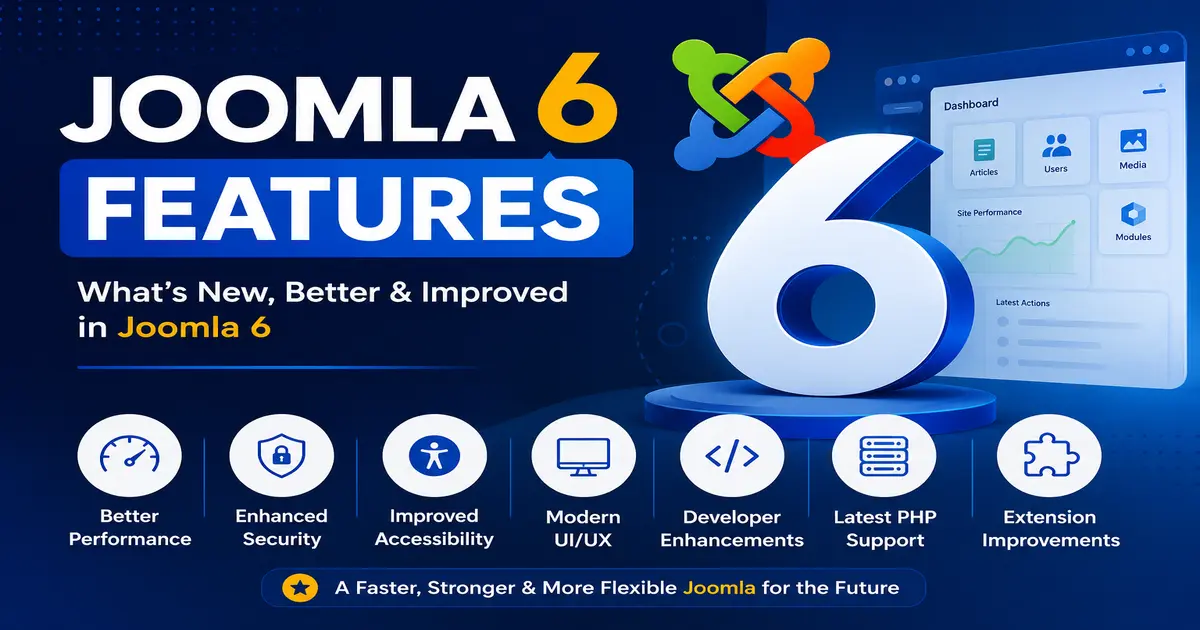
The major features include improved performance, enhanced security, better accessibility, modern administrator interface, latest PHP support, and improved developer tools.
Is Joomla 6 good for SEO?
Yes. Joomla 6 includes clean URLs, fast performance, structured content management, and modern coding practices that help improve SEO.
Should I upgrade to Joomla 6 now?
If your template and extensions support Joomla 6, upgrading is recommended to benefit from the latest security updates and performance improvements.
Stay updated with our latest news, special offers, and exclusive updates directly in your inbox.