Last Updated on August 7, 2026
What is a Content Management System? A Content Management System (CMS) is software that helps you create, organize, edit, manage, publish, and maintain digital content without having to build every part of a website from scratch.
Instead of manually creating HTML files and uploading them whenever you want to publish something new, a CMS provides an administration interface where you can manage website content, users, media, menus, settings, and other features. The CMS then uses that stored content and your site’s design to deliver pages to visitors.
In this guide, we’ll explain what is a Content Management System, how a CMS works, its main components and features, common CMS examples, the benefits and limitations of using one, and how to choose the right CMS for your website.
What Is a Content Management System?
A Content Management System (CMS) is a software application that allows individuals and teams to create, edit, organize, publish, and manage digital content through a centralized interface.
For website owners, the biggest advantage is that you don’t need to manually write and manage every HTML page. A CMS provides the underlying tools needed to manage content while allowing developers and designers to control how that content is presented.
For example, with a CMS you can typically:
- Create and edit articles or pages.
- Upload and manage images, videos, and documents.
- Organize content using categories, tags, or other taxonomies.
- Create and manage navigation menus.
- Manage users, roles, and permissions.
- Schedule or publish content.
- Manage SEO-related settings such as page titles, descriptions, and URLs.
- Extend functionality using plugins, extensions, modules, or integrations.
Modern CMS platforms can also support multilingual websites, content workflows, APIs, accessibility features, structured content, and integrations with external applications.
How Does a Content Management System Work?
To understand how a CMS works, it helps to compare it with a traditional website built from static HTML files.
Without a CMS, you might create an HTML file, upload it to a web server, manually modify its content, and repeat the process whenever the page needs to change. This approach can work for small static websites, but managing hundreds or thousands of pages manually quickly becomes difficult.
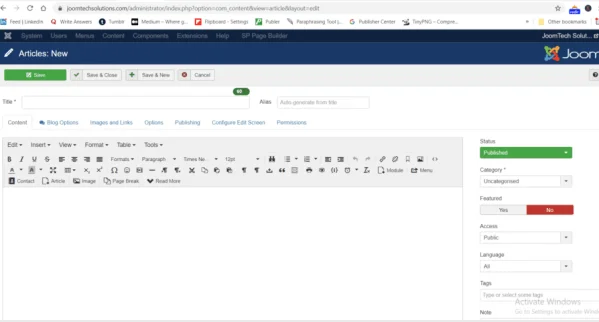
A CMS provides an administration interface that makes content management much easier. You can log in to the administrator area, create or edit content, save it in the database, and publish it without manually editing every page on the server.
For example, Joomla provides an administrator interface where you can manage articles, media, users, menus, categories, extensions, templates, and other website features.
Creating and Managing Website Content
One of the main purposes of a CMS is to make content creation easier. Instead of creating an HTML document manually, an editor can use the CMS administration interface to create an article or page.
The content is stored and managed by the CMS. When a visitor requests the page, the CMS uses the stored content together with the site’s templates, layouts, and configuration to generate the page that the visitor sees.
If you are interested in learning more about Joomla, our Joomla tutorials cover topics such as installation, articles, users, templates, APIs, extensions, and website management.
Managing Images and Other Media
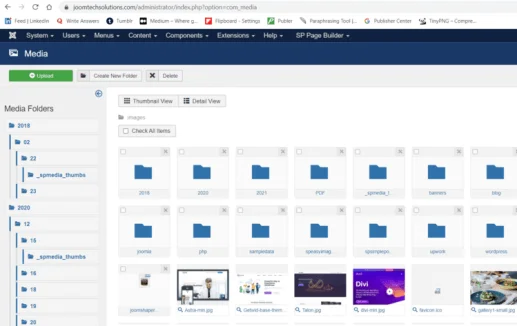
A CMS also provides tools for managing media files such as images, videos, PDFs, and documents. Instead of repeatedly accessing the server’s file system, administrators can upload and organize media through the CMS interface.
This makes it easier for content teams to maintain websites without requiring server-level technical knowledge for everyday tasks.
What Are the Main Components of a CMS?
A traditional CMS is commonly described using two major parts: the Content Management Application (CMA) and the Content Delivery Application (CDA).
Content Management Application (CMA)
The Content Management Application is the part of the CMS that allows authorized users to create, edit, organize, and manage content.
For example, an administrator or editor can use the CMA to create an article, upload an image, assign a category, edit metadata, and publish the content.
Content Delivery Application (CDA)
The Content Delivery Application handles the process of taking managed content and making it available to website visitors.
In a traditional CMS, the CDA works with the database, templates, layouts, and other components to generate the page delivered to the visitor.
Modern architectures can also separate content management from content presentation. This is commonly known as a headless CMS, where content can be delivered through APIs to websites, mobile applications, digital displays, and other applications.
What Does a CMS Do?
A CMS can handle much more than simply creating pages. Depending on the platform, its features can include:
- Content creation: Create articles, pages, products, and other content types.
- Content editing: Update existing content without manually editing HTML files.
- Media management: Upload and organize images, videos, documents, and other files.
- Content organization: Use categories, tags, menus, and taxonomies to organize information.
- User management: Create users and assign roles and permissions.
- Publishing workflows: Draft, review, schedule, publish, update, and archive content.
- SEO management: Manage URLs, metadata, structured content, redirects, and other SEO-related settings depending on the platform.
- Multilingual publishing: Manage content in multiple languages.
- Templates and themes: Control the visual presentation of the website.
- Extensions and integrations: Add functionality through plugins, extensions, modules, APIs, and third-party services.
What Are the Benefits of Using a CMS?
1. You Don’t Need to Code Every Page
One of the biggest advantages of a CMS is that website owners and content editors can manage everyday content without writing HTML, CSS, or PHP for every change.
Developers are still important for advanced customization, integrations, performance improvements, security, and custom functionality, but routine content management can be handled through the administration interface.
2. Easier Content Management
A CMS centralizes website content and gives authorized users a structured way to create and update it. This is particularly useful for websites with multiple authors or editors.
3. User Roles and Permissions
Modern CMS platforms can provide user accounts, roles, permissions, and access controls. This allows organizations to decide who can create, edit, approve, publish, or manage different types of content.
Joomla, for example, provides a flexible access control system that can be used to manage permissions for different users and user groups.
4. Better Collaboration
A CMS can make collaboration easier by allowing multiple people to work on the same website. Depending on the platform, teams may have different permissions and publishing workflows.
5. Easier Website Maintenance
A CMS provides a centralized administration system for managing content and website functionality. Many CMS platforms also provide update mechanisms for the core software and extensions.
However, using a CMS does not eliminate maintenance. Website owners should still keep the CMS, extensions, themes, server software, and backups properly maintained.
What Are Some Examples of a CMS?
There are many different types of CMS platforms. Some are open-source applications that you install on your own hosting, while others are hosted platforms that manage the technical infrastructure for you.
Popular examples include:
- WordPress – widely used for blogs, business websites, publishing platforms, and many other types of websites.
- Joomla – an open-source CMS known for flexibility, multilingual capabilities, access control, and extensibility.
- Drupal – an open-source platform often used for complex content structures and larger organizations.
- TYPO3 – an enterprise-oriented open-source CMS.
- Wix – a hosted website platform designed to make website creation accessible to non-developers.
- Squarespace – a hosted platform focused on website creation, design, and content management.
There are also specialized platforms for eCommerce, digital publishing, enterprise content management, and headless content delivery.
What Types of Websites Can You Build With a CMS?
Modern CMS platforms are flexible enough to support many different types of websites. The exact capabilities depend on the CMS and its available extensions or integrations.
Common examples include:
- Business websites
- Blogs
- News and magazine websites
- Corporate websites
- Portfolio websites
- Membership websites
- Community websites
- Educational websites
- Online course platforms
- eCommerce websites
- Multilingual websites
- Intranet and internal websites
- Headless websites and web applications
What Is a Headless CMS?
A headless CMS separates content management from the presentation layer.
In a traditional CMS, the system usually manages both the content and the way that content is displayed on the website. In a headless architecture, the CMS primarily manages structured content and provides that content through APIs.
The same content can then be consumed by different applications, such as:
- Websites
- Mobile applications
- Single-page applications
- Digital displays
- Voice applications
- Other external systems
This architecture is particularly useful for organizations that need to publish the same content across multiple digital channels.
For developers who want to understand Joomla’s content management and permissions system, our guide to Joomla Access Control List (ACL) explains how users, groups, and permissions work.
What Is the Difference Between a CMS and a Website Builder?
A CMS and a website builder can both be used to create websites, but they usually provide different levels of control.
| Feature | CMS | Website Builder |
|---|---|---|
| Content management | Usually extensive | Usually built into the platform |
| Customization | Often highly flexible | Usually more guided |
| Extensions | Often supports plugins/extensions | Usually uses built-in apps or integrations |
| Hosting | Depends on the CMS | Often included |
| Technical control | Can be extensive | Usually more limited |
The right choice depends on your technical requirements, budget, content workflow, scalability needs, and how much control you want over the website.
How Do You Choose the Best CMS?
There is no single CMS that is perfect for every website. The best choice depends on what you want to build and how you plan to manage the website.
Before choosing a CMS, consider the following factors:
Ease of Use
Consider who will manage the website. If non-technical users will regularly create and edit content, the administration interface should be easy to understand.
If you are comparing popular CMS platforms, you can also read our detailed guide on Joomla eCommerce solutions and CMS-related platforms to understand how different Joomla-based solutions can be used for online stores.
Customization and Extensibility
If your website requires custom features, integrations, APIs, or complex content structures, choose a CMS that provides enough flexibility for future development.
Security
Look at the CMS’s security practices, update process, extension ecosystem, user permissions, and community support. A CMS is only one part of website security, so hosting and server configuration also matter.
SEO Features
Look for control over URLs, metadata, redirects, canonicalization, structured data, XML sitemaps, performance, and other technical SEO requirements. Remember that choosing a CMS alone does not guarantee better search rankings.
Performance and Scalability
Consider how much traffic and content the website may have in the future. Caching, hosting infrastructure, database optimization, CDN support, and efficient development can all affect performance.
Multilingual and Accessibility Requirements
If your organization serves users in different countries or languages, check the CMS’s multilingual capabilities. You should also consider accessibility features and whether the templates, extensions, and content workflows can support accessible websites.
Is Joomla a Content Management System?
Yes. Joomla is a free and open-source Content Management System used to publish and manage web content. Joomla’s official description highlights capabilities including multiple user permission levels, multilingual support, extensibility, accessibility, responsive design, and search-engine-friendly functionality.
Joomla can be used for business websites, portals, community websites, multilingual websites, publishing platforms, and applications that require more advanced content structures and access control.
If you are learning Joomla, you can explore our Joomla tutorials for practical guides on installation, users, articles, categories, ACL, APIs, templates, extensions, and other Joomla features.
CMS vs Custom-Coded Website
A CMS is not always the right solution. Some projects benefit from a custom application or a specialized web framework.
A CMS is generally useful when you need regular content publishing, multiple content editors, reusable content structures, media management, user permissions, or an established administration interface.
A custom application may be more appropriate when the project requires highly specialized business logic that does not fit naturally into a conventional CMS.
In many real-world projects, the decision is not simply “CMS versus custom code.” Developers can also extend a CMS with custom components, plugins, APIs, integrations, and custom applications.
What Is the Future of CMS Platforms?
CMS platforms are evolving beyond simple page and article management. Modern content platforms increasingly need to support structured content, APIs, omnichannel publishing, automation, personalization, accessibility, security, and AI-assisted workflows.
AI can assist content teams with tasks such as drafting, summarizing, translation, classification, content recommendations, and search. However, human review remains important for accuracy, quality, originality, accessibility, and brand consistency.
Headless and hybrid architectures are also becoming important for organizations that need to deliver the same content to websites, applications, and other digital channels.
Conclusion: What Is a Content Management System?
So, what is a Content Management System? A CMS is software that helps you create, organize, manage, and publish digital content without requiring you to manually build every page from code.
A modern CMS can provide much more than a simple backend. It can include content workflows, user permissions, media management, SEO tools, multilingual capabilities, templates, extensions, APIs, structured content, and integrations.
The best CMS depends on your website’s goals, content requirements, technical needs, budget, scalability, and the people who will manage it. WordPress, Joomla, Drupal, TYPO3, Wix, Squarespace, and many specialized platforms all solve different problems.
If you are planning to build a website, understanding these differences will help you choose a CMS that fits your project instead of simply choosing the most popular platform.
If you are planning to build a Joomla website, you can also follow our guide on Joomla 6 Web Services to learn how Joomla content can be accessed through APIs and used with external applications.
Frequently Asked Questions About Content Management Systems
What is a Content Management System?
A Content Management System (CMS) is software that allows users to create, edit, organize, manage, and publish digital content, usually through an administration interface. A CMS reduces the need to manually create and update every website page with code.
What is the main purpose of a CMS?
The main purpose of a CMS is to make digital content easier to create, manage, organize, and publish. Depending on the platform, it can also provide user permissions, media management, SEO features, workflows, multilingual publishing, templates, extensions, and APIs.
Is WordPress a CMS?
Yes. WordPress is a content management system that can be used to create and manage blogs, business websites, publishing websites, online stores, membership sites, and many other types of websites.
Is Joomla a CMS?
Yes. Joomla is a free and open-source content management system for publishing and managing web content. It provides features such as user permissions, multilingual capabilities, templates, extensions, and APIs.
What is a headless CMS?
A headless CMS separates content management from the presentation layer. It stores and manages structured content and typically delivers that content through APIs so it can be used by websites, mobile applications, and other digital experiences.
Stay updated with our latest news, special offers, and exclusive updates directly in your inbox.