Last Updated on August 15, 2026
If you have been working with Joomla for a while, you may eventually need to change the way a component, module, or other extension displays its content. You can often achieve simple visual changes with CSS, but sometimes you need to change the actual HTML or PHP output.
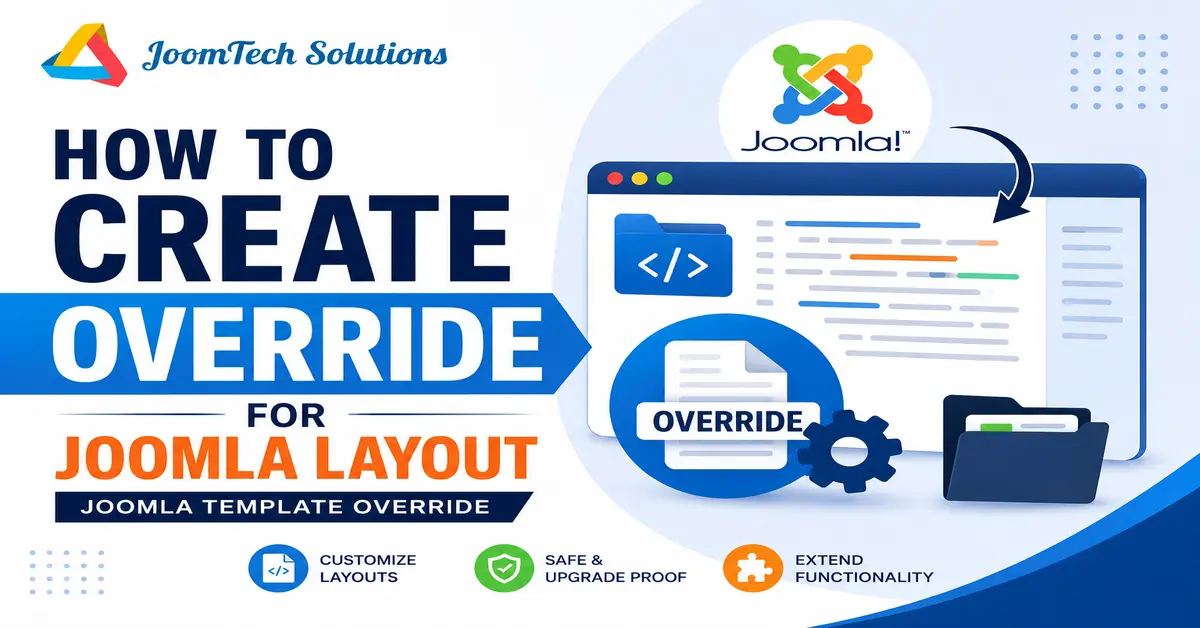
This is where a Joomla template override becomes useful. A template override allows you to customize the output of a Joomla component, module, or layout without modifying the original extension files.
In this guide, you will learn how to create a Joomla template override in Joomla 6, where the override files are stored, how to create overrides for components and modules, and how to work with Joomla layouts.
Most importantly, you will also learn why using an override is safer than directly editing Joomla core or extension files.
What Is a Joomla Template Override?
A Joomla template override is a customized copy of an extension’s layout file that is stored inside the active site template. Joomla uses the override instead of the original layout when generating the frontend output.
For example, if you want to customize the way a Joomla article is displayed, you can create an override for the relevant com_content layout rather than modifying the original component files.
The override is normally stored inside the html directory of your active site template.
/templates/your-template/html/Joomla’s documentation describes this html directory as the location where template overrides are stored.
Joomla modules are another common area where template overrides are useful. If you are new to Joomla modules, first learn how to create a Joomla module and configure its basic settings before customizing its output with an override.
Why Should You Use Joomla Template Overrides?
One of the biggest mistakes beginners make is directly editing the files of a Joomla component or module to change its appearance.
I made the same mistake when I started working with Joomla. If I needed to change the output of a component or module, I would modify the original file. The problem became obvious after updating Joomla or the extension because the update could replace the modified file and remove all of my customizations.
A template override solves this problem by keeping your customized layout inside the template instead of changing the original extension files.
For example, instead of changing a core module file such as:
/modules/mod_login/tmpl/default.phpyou can create an override inside your active template:
/templates/your-template/html/mod_login/default.phpThis approach makes your customization easier to manage and keeps the original Joomla extension files untouched. Joomla’s documentation specifically recommends this approach for customizing extension output.
What Can You Override in Joomla?
Joomla provides a built-in interface that makes it much easier to create overrides. Depending on the extension and Joomla version, you may see several types of override options.
The main categories you will commonly work with are:
- Components – customize component views and their layouts.
- Modules – customize the HTML output of modules.
- Plugins – some plugins provide layouts that can be overridden.
- Layouts – override reusable Joomla layouts used by different parts of the system.
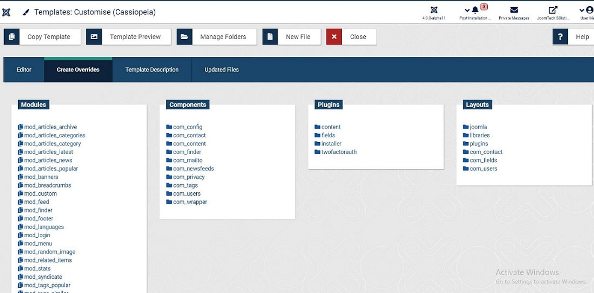
Joomla’s Template Customise screen provides a Create Overrides tab where supported components, modules, plugins, and layouts can be selected.
A practical example of using a Joomla template override is customizing the Login Form. For example, you can use an override to remove the Forgot Username and Forgot Password links from the Joomla login form. See our step-by-step guide on how to remove Forgot Password and Forgot Username links in Joomla.
How to Create a Joomla Template Override in Joomla 6
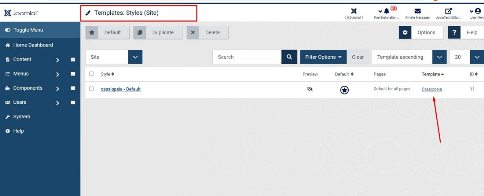
Step 1: Open the Site Templates
Log in to your Joomla Administrator and open:
System → Templates → Site Templates
Joomla’s template manager allows you to view the installed site templates and open the files associated with the active template.
For this example, the original article used Cassiopeia. The same basic process applies to other Joomla site templates that support template overrides.
Joomla provides a built-in mechanism for overriding extension output through the active site template. For a deeper explanation of how overrides work and how Joomla stores them, see the official Joomla template overrides documentation.
Step 2: Open the Template Details and Files
Select the site template you want to customize. This opens the template’s details and file management interface.
From here, Joomla provides access to the template files and the tools required to create overrides.
In current Joomla versions, you can access the Create Overrides feature directly from the template customization interface.
Step 3: Open Create Overrides
Inside the template customization screen, select the Create Overrides tab.
Joomla will display the extensions and layouts for which an override can be created.
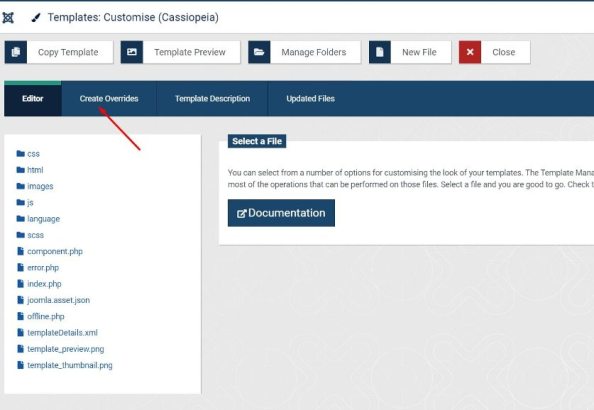
Instead of manually creating every directory and copying files yourself, Joomla can create the appropriate override structure for you. This is especially useful for beginners because it reduces the chance of using an incorrect folder or filename.
How to Create a Joomla Component Override
Let’s start with a component override. Joomla’s com_content component is a common example because it controls articles and several other content views.
Under the Components section, select com_content.
Joomla will display the available views and layouts that can be overridden.
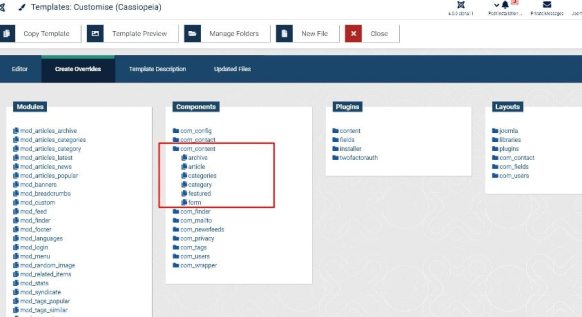
Select the view or layout that you want to customize. Joomla will then create the corresponding files inside the active template’s html directory.
A component override can look similar to this:
/templates/your-template/html/com_content/article/default.phpThe exact path depends on the component, view, and layout you are overriding.
How to Create a Joomla Module Override
Joomla modules can also be customized using template overrides. This is useful when you want to change the HTML structure or presentation of a module without modifying the module’s original files.
For example, you might want to customize the output of:
- Login Form
- Menu
- Latest Articles
- Custom
- Breadcrumbs
- Banner
For example, the Login Form module uses the module type mod_login.
Select the required module from the Modules section in the Create Overrides interface.
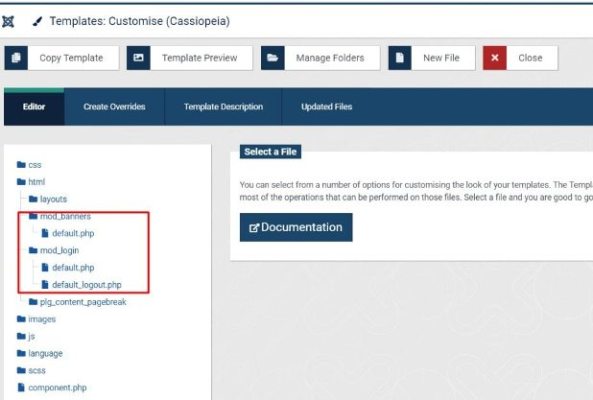
Joomla will create the required module override files inside the active template’s html directory.
For example, a Login Form module override can be located at:
/templates/your-template/html/mod_login/default.phpOnce the override exists, you can edit it to customize the module’s frontend output.
How to Create a Joomla Layout Override
Joomla also supports overrides for reusable layouts. These layouts can be used by different extensions and parts of the Joomla application.
From the Create Overrides tab, look for the Layouts section. Select the layout you want to override.
Joomla will create the appropriate files within the active template’s html directory.
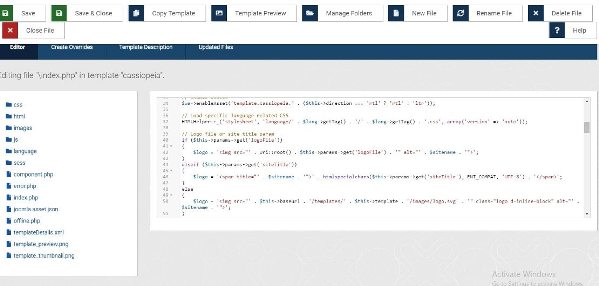
Layout overrides are different from simply changing CSS. They allow you to change the actual markup and PHP logic used to generate the output.
Joomla layouts and template overrides can work together to provide more control over frontend output. If you want to understand the different layout and override options available in Joomla, refer to the official Joomla template layouts documentation.
Where Are Joomla Template Override Files Stored?
All template overrides belong to the active site template. The basic structure is:
/templates/your-template/html/For example, a component override might use:
/templates/your-template/html/com_content/article/default.phpA module override might use:
/templates/your-template/html/mod_login/default.phpAnd a reusable Joomla layout may use a path under:
/templates/your-template/html/layouts/The exact directory structure depends on what you are overriding. Joomla’s documentation provides examples of component, module, and layout override structures.
Template overrides are stored within the active site template, so it is useful to understand how Joomla templates are installed and managed. If you are working on a local development website, see our tutorial on how to install a Joomla template on localhost.
How to Edit a Joomla Template Override
After creating an override, you can open the file from Joomla’s template editor or edit it using your preferred development tools.
The original article described editing CSS, JavaScript, and PHP files directly through the Joomla Administrator. Current Joomla installations still provide a template customization interface, but for larger development projects I recommend using a proper development workflow and keeping backups of your changes.
When editing a PHP override, make sure you understand the code before changing it. A small PHP syntax error can prevent the affected page from rendering correctly.
You should also avoid unnecessarily copying or modifying large sections of an extension layout. Keep the override as small and focused as possible.
Template Override vs Alternative Layout
These two terms are sometimes confused, but they are not exactly the same.
A normal template override replaces the matching default output for the active template. An alternative layout allows you to create another layout that can be selected when the extension supports that option.
For example, if you want every instance of a particular module to use your customized default markup, a template override may be appropriate.
If you need two different designs for the same module, an alternative layout may be a better solution because you can select the required layout where the extension provides that setting.
Understanding this difference can help you avoid creating an override when an alternative layout would provide more flexibility.
Why You Should Not Edit Joomla Core Files
Never make permanent customizations by directly modifying Joomla core component or module files unless you have a very specific development reason and understand the consequences.
When customizing Joomla output, it is important to keep your changes separate from the original extension files. Joomla’s documentation explains the purpose of output overrides and how they allow you to customize extension output from your template. You can read more in the official guide to understanding Joomla output overrides.
For example, changing:
/modules/mod_login/tmpl/default.phpdirectly means your changes belong to the extension itself. An extension or Joomla update may replace that file.
With an override, your customization is kept inside the site template instead:
/templates/your-template/html/mod_login/default.phpThis separation makes the customization much easier to maintain. Joomla’s official documentation specifically warns against editing supplied template files directly because updates can overwrite those changes.
Important Tips for Joomla Template Overrides Keep Your Overrides Small
Only change the code you actually need. A small override is easier to understand and maintain when Joomla or an extension receives an update.
Test After Joomla Updates
Template overrides are not automatically updated when the original extension layout changes. An update may introduce new variables, markup, accessibility improvements, or functionality that your old override does not contain.
After updating Joomla or an extension, check your overrides carefully and compare them with the current original layout when necessary. Joomla Community Magazine also highlights maintenance of outdated overrides as an important consideration after updates.
Use a Development or Staging Website
If you are making significant changes, test them on a development or staging website first. This is particularly important when editing PHP files.
Before making major changes, create a reliable backup of your website. If something goes wrong, you can restore the site and investigate the problem without affecting visitors.
Use Version Control for Development
If you regularly develop Joomla websites, consider keeping your template customization in version control. This makes it easier to see what changed and restore a previous version of an override when required.
Check Third-Party Extensions Carefully
Not every extension follows exactly the same structure. Some third-party extensions provide their own override mechanisms, while others may require you to follow their documentation.
If you are making extensive frontend customizations, you may also want to consider using a Joomla 6 child template. This can provide a cleaner way to maintain template customizations while keeping the parent template separate from your changes.
Before creating an override for a third-party extension, check which layouts are available and whether the extension developer provides any specific customization instructions.
Can Template Overrides Affect Website Performance?
A normal template override does not automatically make a Joomla website slower. The main purpose of an override is to change the generated output.
However, poorly written PHP, unnecessary database queries, large amounts of additional markup, or inefficient code inside an override can affect performance.
For this reason, keep your overrides efficient and avoid adding unnecessary processing to every page load.
Can Joomla Template Overrides Affect SEO?
A template override does not inherently harm SEO. In fact, a well-designed override can help you produce cleaner semantic HTML, improve accessibility, or provide better control over structured content.
However, the output generated by your override still matters. Avoid removing important headings, links, image attributes, structured data, or other content that search engines and users need.
After creating an override, check the final HTML output in your browser and test important pages to make sure your changes have not removed useful content.
What Happens to Template Overrides After a Joomla Update?
Your override files normally remain inside your template when Joomla itself is updated. However, this does not mean that the override will always remain compatible with the updated extension.
For example, Joomla may change the original layout and introduce new functionality. Your older override may continue to display the old markup and therefore miss those changes.
This is why you should review important overrides after Joomla and extension updates rather than assuming they will always work perfectly.
How to Troubleshoot a Joomla Template Override
The Override Is Not Working
First, confirm that the override was created inside the site template that is actually being used on the page.
If your website uses multiple templates or template styles, an override in one template will not automatically be used by another template.
The Page Shows a PHP Error
Check the PHP code you recently changed. A missing bracket, semicolon, quote, or incorrect variable can cause an error.
If the problem started immediately after editing the override, temporarily restore the previous working version and then make the changes again one at a time.
The New Joomla Feature Is Missing
Compare your override with the current original layout. The extension may have changed after an update while your override still contains older code.
The Override Works on One Page but Not Another
Check whether different template styles are assigned to those menu items. A template override belongs to the template being used to render the page, so a different template can use a different override set.
When Should You Avoid a Joomla Template Override?
Template overrides are powerful, but they are not always the best solution.
If your goal can be achieved with Joomla’s normal settings, a module parameter, CSS, a custom field, an alternative layout, or another supported extension feature, consider using that approach first.
You should also avoid creating an override simply because you can. Every override becomes another piece of code that you may need to review after future Joomla or extension updates.
Conclusion
A Joomla template override is one of the most useful features for developers and website owners who need to customize Joomla’s frontend output without modifying the original extension files.
With Joomla’s built-in Create Overrides feature, you can create overrides for supported components, modules, plugins, and layouts directly from the Administrator interface.
The most important rule is simple: do not modify Joomla core or extension files when a template override can safely provide the customization you need.
Keep your overrides focused, test them after updates, and use a staging environment for major changes. Following these practices will make your Joomla customizations easier to maintain over the long term.
Frequently Asked Questions About Joomla Template Overrides
What is a Joomla template override?
A Joomla template override is a customized copy of an extension layout stored inside the active site template. Joomla uses the override instead of the original layout, allowing you to customize frontend output without modifying the extension’s original files.
How do I create a Joomla template override?
In Joomla 6, go to System → Templates → Site Templates, open the site template you want to customize, and select Create Overrides. Choose the supported component, module, plugin, or layout that you want to customize.
Where are Joomla template overrides stored?
Template overrides are stored inside the html directory of the active site template. For example, a Login Form module override can be stored at /templates/your-template/html/mod_login/default.php.
Will a Joomla template override be removed during a Joomla update?
Your override file normally remains inside your template, but it may become outdated if Joomla or an extension changes its original layout. Review important overrides after updates to make sure they still work correctly.
Should I edit Joomla core files instead of creating an override?
No. Editing core or extension files can cause your customizations to be overwritten during updates. A template override keeps your customization separate from the original files and is generally the better approach for changing frontend output.
Stay updated with our latest news, special offers, and exclusive updates directly in your inbox.