Last Updated on June 20, 2026
Joomla is a free and open-source content management system (CMS) used to build websites, blogs, portals, and web applications. Whether you want to create a simple business website or a more advanced custom application, Joomla gives you a flexible foundation with powerful built-in features.
At its core, Joomla is built on a Model–View–Controller (MVC) architecture. This structure helps separate data, presentation, and application logic, making Joomla easier to extend, maintain, and customize. For developers, this architecture is one of Joomla’s biggest strengths because it supports clean extension development and the creation of scalable web applications.
What is Joomla?
Joomla is a PHP-based CMS that stores and manages website content using a database such as MySQL or PostgreSQL. It follows modern development practices and includes features like template overrides, multilingual support, user access control, custom fields, media management, and a large ecosystem of extensions.
One of Joomla’s biggest advantages is its flexibility. It supports both frontend design customization via templates and backend administration to manage content, users, menus, modules, and extensions. This makes it a solid choice for beginners, site owners, and developers alike.
In this Joomla tutorial series, you’ll learn the essentials of working with Joomla step by step. We’ll cover topics such as Joomla basics, menus, modules, components, global configuration, templates, and more advanced Joomla features so you can build and manage websites more confidently.
Do you want to learn Joomla?
If you want to learn Joomla, you’re in the right place. Here you’ll find practical Joomla tutorials, guides, and examples designed to help you understand both the basics and the more advanced parts of Joomla website development.
Before diving deeper, it helps to have a basic understanding of HTML, CSS, JavaScript, and jQuery, especially if you plan to customize layouts, templates, or frontend behavior. If you’re new to these topics, it’s worth learning the basics first—they’ll make Joomla much easier to understand.
You can also continue with related tutorials such as How to Create a Joomla Layout Override, Joomla Template Overrides Explained, or Joomla Module vs Component: What’s the Difference? For official documentation and release updates, it’s also a good idea to refer to the Joomla documentation and the Joomla project website.
Joomla Architecture
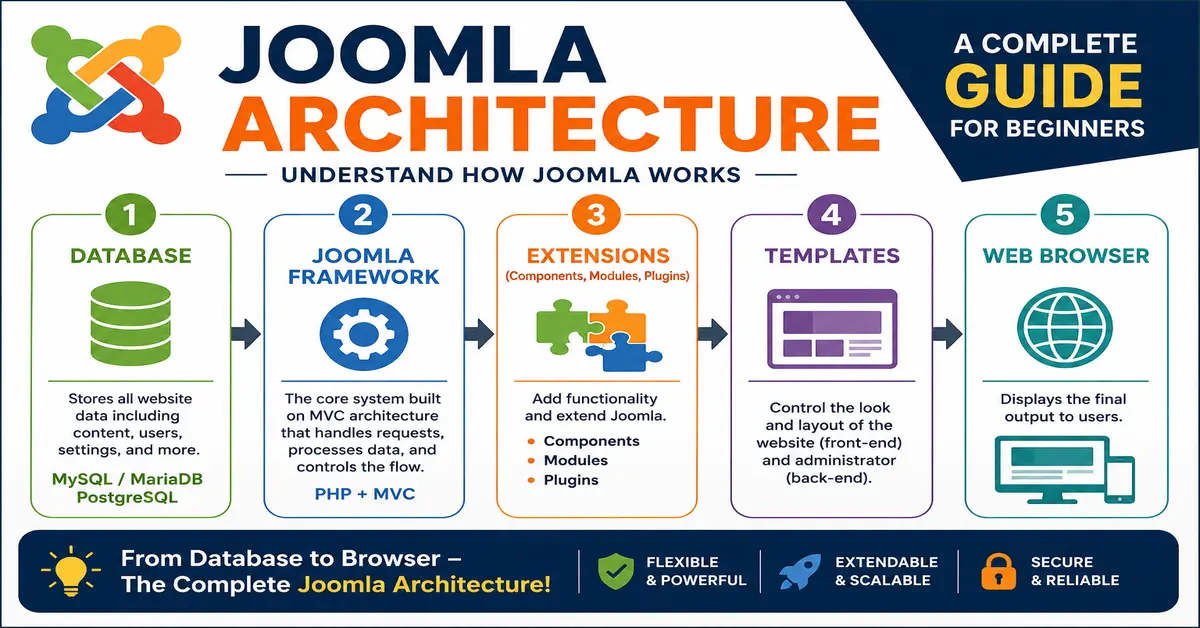
Joomla architecture can be understood in five main layers. Each layer plays an important role in how Joomla works, from storing data to displaying the final output in the browser.
The five levels of Joomla architecture are:
- Database
- Joomla Framework
- Extensions (Components, Modules, Plugins)
- Templates
- Web Browser

What is Joomla Architecture?
Joomla architecture refers to the way Joomla is structured internally to manage content, process requests, and display web pages. It combines the database layer, the Joomla framework, extensions, templates, and the browser output into one complete content management system.
You may also like to read: Which is faster: Drupal, WordPress, or Joomla?
1) Database
The database is the foundation of Joomla because it stores website content, user information, menu items, module settings, extension data, and other configuration details.
Modern Joomla supports popular database systems such as MySQL, MariaDB, and PostgreSQL. You can also review the official Joomla technical requirements to check the currently supported software versions.
- MySQL / MariaDB
- PostgreSQL
In most Joomla installations, MySQL or MariaDB is commonly used because it is widely supported by hosting providers and works well for small as well as large websites.
2) Joomla Framework
Joomla is built on a flexible PHP-based framework and follows the MVC (Model–View–Controller) architecture. This structure separates the application logic, data handling, and presentation layer, making Joomla easier to maintain, customize, and extend.
The Joomla framework is one of the reasons developers like working with Joomla. It provides a structured way to build custom extensions, manage data, and create scalable web applications beyond a standard CMS website. If you want to understand the developer side in more detail, Joomla’s official MVC overview documentation is a useful reference.
Joomla has long been one of the most popular open-source CMS platforms, known for offering a good balance between ease of use and developer flexibility. You can explore the project further on the official Joomla website.
3) Extensions (Components, Modules, Plugins)
Joomla can be extended with three main types of extensions: Components, Modules, and Plugins. These extensions add features and control how content is displayed and processed.
Components
Components are the major functional units of Joomla. You can think of a component as a mini-application that runs inside your Joomla website. For example, content management, contact forms, banners, and many third-party applications are handled by components.
In most cases, a component controls the main content area of a page. When a visitor opens a page, Joomla loads the relevant component and displays its output in the main section of the template. You must read our tutorial What are Components in Joomla! 5
Modules
Modules are lightweight and flexible extensions used to display content or functionality in different positions of a page. They are commonly used for features such as login forms, menus, search boxes, latest articles, custom HTML blocks, and more.
Unlike components, modules are usually displayed around the main content area. Joomla allows you to assign modules to specific menu items, which means you can show or hide a module depending on the page being viewed. For more details, you should read our recent tutorial: How to Create a Custom Module in Joomla 5 and Joomla 6 Step By Step
Plugins
Plugins are event-based extensions in Joomla. They run automatically when a specific event is triggered in the system, such as saving an article, logging in a user, processing content, or extending the behavior of a component.
Plugins are especially useful for developers because they provide a clean way to modify or extend Joomla functionality without changing core files. Joomla includes many built-in plugin events, and custom extensions can also trigger their own events. For more details about Joomla Plugins, you can explore our tutorial: How to Create a WordPress Plugin
You may also like to read: Why Joomla is better than WordPress?
4) Templates
Templates control the design and layout of a Joomla website. They define how content is presented on the front end and how the administrator area looks in the back end.
Front-end Templates
Front-end templates control how your website appears to visitors. They manage the layout, styling, module positions, typography, and overall design of the public-facing part of the site.
Joomla allows you to install third-party templates or build your own custom template. You can also assign different templates to different menu items if needed, although many websites use a single template across the whole site. To learn more about Joomla versions and the official project roadmap, you can browse the Joomla downloads page and the Joomla documentation versions page.
Back-end Templates
Back-end templates control the appearance of the Joomla administrator panel. These templates affect how the dashboard, menus, forms, and configuration screens look for site administrators.
Although most site owners use Joomla’s default administrator interface, Joomla also supports custom administrator templates for specialized workflows or branding requirements.
5) Web Browser
The web browser is the final layer of Joomla architecture. It is the platform where users view the output generated by Joomla. After Joomla processes the request, loads data from the database, applies the template, and renders the page, the final result is displayed in the browser.
In simple terms, the browser is where visitors interact with your Joomla website and see the content created through all the other layers of the Joomla architecture.
Components vs Modules vs Plugins in Joomla
Joomla extensions are divided into three main types: components, modules, and plugins. Each one has a different role in how a Joomla website works. The table below gives a quick comparison to help you understand the difference.
| Feature | Components | Modules | Plugins |
|---|---|---|---|
| Purpose | Main functional part of Joomla; it works like a mini-application. | Displays small blocks of content or features around the page. | Extends Joomla functionality by responding to system or extension events. |
| Output Area | Usually displayed in the main content area of the page. | Displayed in template positions such as sidebar, header, footer, or top area. | Usually works in the background and may or may not display visible output. |
| Examples | Content, Contact, Banners, Weblinks, custom booking component. | Login module, Menu module, Latest Articles, Custom HTML module. | Content plugin, Authentication plugin, System plugin, Search plugin. |
| Complexity | More complex; used for core features and larger applications. | Lighter and simpler than components. | Lightweight but powerful for extending behavior and automation. |
| Runs On | Loads when a page request calls that specific component. | Loads based on module assignment and menu item settings. | Runs when a specific Joomla event is triggered. |
| Typical Use Case | Managing articles, forms, directories, events, eCommerce, or custom applications. | Showing menus, login forms, banners, related posts, or custom content blocks. | Adding custom logic during save, login, content display, redirects, or system actions. |
| Frontend / Backend | Can have both frontend and administrator areas. | Mostly used on the frontend, but administrator modules also exist. | Can work in both frontend and backend, depending on the plugin type. |
| Best Way to Think About It | A full application inside Joomla. | A small content block is placed around the page. | A background helper that adds or changes functionality when something happens. |
Joomla Architecture FAQ
What is Joomla architecture?
Joomla architecture is the internal structure of Joomla that defines how the CMS stores data, processes requests, loads extensions, applies templates, and displays content in the browser. It includes different layers such as the database, Joomla framework, extensions, templates, and the web browser.
How many layers are there in Joomla architecture?
Joomla architecture is commonly explained in five layers: the database, Joomla framework, extensions, templates, and the web browser. Together, these layers help Joomla manage content and render web pages efficiently.
What is the role of the database in Joomla?
The database stores important Joomla website data such as articles, menu items, user accounts, module settings, extension configurations, and other website information. Joomla typically works with databases such as MySQL, MariaDB, and PostgreSQL.
Does Joomla use MVC architecture?
Yes, Joomla follows the MVC (Model–View–Controller) architecture. This approach separates business logic, data handling, and presentation, which makes Joomla easier to develop, customize, and maintain.
What are the main types of Joomla extensions?
Joomla mainly supports three types of extensions: components, modules, and plugins. Components handle major application-level functionality, modules display smaller content blocks in template positions, and plugins extend Joomla by responding to system or extension events.
What is the difference between components, modules, and plugins in Joomla?
Components are the main functional applications inside Joomla, modules are lightweight blocks used to display content in specific positions, and plugins are event-based extensions that add or modify functionality when certain actions occur in Joomla.
What is the purpose of Joomla templates?
Joomla templates control the design and layout of a website. Front-end templates affect how the website looks to visitors, while back-end templates control the appearance of the Joomla administrator area.
Can Joomla work without extensions?
Yes, Joomla includes many built-in features and core extensions that allow you to create and manage a website without installing third-party extensions. However, extensions are often used to add advanced functionality such as forms, eCommerce, booking systems, or custom features.
Why is Joomla architecture important for developers?
Understanding Joomla architecture helps developers build custom extensions, create template overrides, optimize performance, and maintain Joomla websites more effectively. It also makes it easier to understand how different parts of Joomla interact with each other.
Which database is commonly used with Joomla?
MySQL or MariaDB is the most commonly used database with Joomla because it is widely supported by web hosting providers and works well for most Joomla websites. Joomla also supports PostgreSQL.
Stay updated with our latest news, special offers, and exclusive updates directly in your inbox.