Last Updated on August 10, 2026
Joomla 6 includes powerful web services that allow developers to communicate with a Joomla website through a REST API. Instead of creating and managing articles manually from the Joomla administrator panel, you can use the API to create articles programmatically from applications, scripts, mobile apps, or external systems.
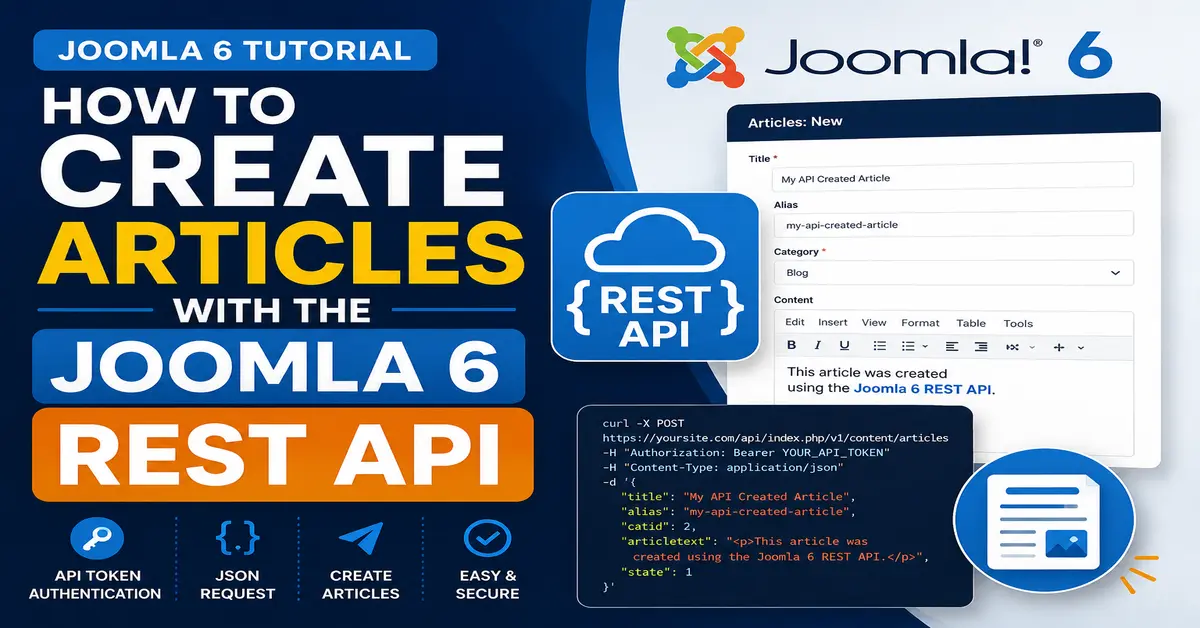
In this tutorial, you will learn how to create articles with the Joomla 6 REST API step by step. We will look at the API endpoint, authentication, required fields, request headers, JSON data, and a practical example using cURL and Postman.
This guide is especially useful for Joomla developers who want to automate content creation or connect Joomla 6 with another application.
What Is the Joomla 6 REST API?
The Joomla 6 REST API provides a way for external applications to communicate with Joomla using HTTP requests. Instead of interacting directly with the Joomla database, an application can send requests to Joomla’s API endpoints.
For example, you can use the REST API to:
- Create Joomla articles
- Update existing articles
- Retrieve articles
- Delete articles
- Manage users and other supported resources
- Connect Joomla with external applications
- Automate repetitive content-management tasks
For creating an article, your external application sends a POST request containing the article information to the Joomla API.
Before working with the REST API, it is helpful to understand how Joomla 6 Web Services work and how they allow external applications to communicate with your Joomla website. You can learn more in our complete guide to Joomla 6 Web Services.
What Do You Need Before Creating an Article?
Before making your first API request, you should have a working Joomla 6 website and access to a Joomla user account that is allowed to use the API.
You will also need an API authentication token. Joomla 6 provides API authentication through the Web Services API and user API tokens.
Make sure you have the following:
- A Joomla 6 website
- A Joomla user account with appropriate permissions
- An API token
- The article category ID
- The Joomla API URL
- A tool such as Postman, cURL, or another HTTP client
Find Your Joomla 6 API URL
The Joomla API is normally accessed through the /api/index.php endpoint of your website.
For example, if your website is:
https://example.comyour API base URL will generally be:
https://example.com/api/index.phpThe exact endpoint used for creating an article depends on the Joomla API resource you are working with.
Enable API Authentication in Joomla 6
Authentication is important because Joomla must know which user is making the API request. You should not expose article-creation functionality to unauthenticated users.
Open the Joomla Administrator
Log in to your Joomla 6 administrator dashboard.
Go to:
System → Manage → PluginsSearch for the Joomla API or authentication-related plugins required by your Joomla installation and make sure the appropriate Web Services and API authentication plugins are enabled.
Joomla API authentication is an important part of working with protected resources. For a detailed explanation, see our guide on Joomla 6 Web Services and API Authentication.
Create or Find the User API Token
Open the Joomla user account that you want to use for API access.
Depending on your Joomla configuration, the API token can be managed from the user’s account settings. Copy the generated token and keep it secure.
Important: Never publish your API token in a blog post, GitHub repository, JavaScript file, or publicly accessible source code.
For additional technical details about Joomla Web Services and API authentication, refer to the official Joomla API Specification.
How to Create Articles with the Joomla 6 REST API
Now let’s look at the actual process of creating an article.
The basic workflow is:
- Authenticate your request.
- Send a POST request to the article API endpoint.
- Provide the article data as JSON.
- Joomla validates the request.
- Joomla creates the article if the user has sufficient permissions.
- The API returns the result.
Prepare the Article Data
An article request typically requires information such as the article title, alias, category, and body.
A simple JSON request can look similar to the following:
{
  "title": "My First API Article",
  "alias": "my-first-api-article",
  "catid": 2,
  "state": 1,
  "featured": 0,
  "language": "*",
  "access": 1,
  "introtext": "<p>This article was created using Joomla 6 API.</p>",
  "fulltext": "<p>This is the full article content.</p>"
}
The exact fields accepted by an endpoint can vary, so you should always verify the resource definition for the Joomla version and API endpoint you are using.
Use Postman to Create a Joomla Article
Postman is one of the easiest tools for testing REST APIs. It allows you to create requests without writing a complete application.
Open Postman and create a new request.
Set the HTTP method to:
POSTThen enter your Joomla API article endpoint.
Your request URL will be based on your Joomla website, for example:
https://example.com/api/index.php/v1/content/articlesMake sure you use the correct endpoint for your Joomla 6 installation and API configuration.
Add the Authorization Header
Next, add the API token to the request authentication header.
A common token-based request uses an Authorization header similar to:
Authorization: Bearer YOUR_API_TOKENReplace YOUR_API_TOKEN with your actual Joomla API token.
You should also send JSON content:
Content-Type: application/jsonFor example, the headers may look like:
Authorization: Bearer YOUR_API_TOKEN
Content-Type: application/json
Add the JSON Request Body
In Postman, select Body, choose raw, and select JSON as the format.
You can then provide your article information, for example:
{
  "title": "My First API Article",
  "alias": "my-first-api-article",
  "catid": 2,
  "state": 1,
  "featured": 0,
  "language": "*",
  "access": 1,
  "introtext": "<p>This article was created using Joomla 6 API.</p>",
  "fulltext": "<p>This is the full article content.</p>"
}
Click Send to submit the request.
If your authentication, endpoint, permissions, and request data are correct, Joomla should process the request and return a response containing information about the created article.
If you are new to API testing, check our step-by-step guide on How to Test Joomla 6 REST API Using Postman before creating your first article request.
Create a Joomla 6 Article Using cURL
If you prefer working from the command line, you can also use cURL to send the request.
A basic example looks like this:
curl -X POST "https://example.com/api/index.php/v1/content/articles" \
-H "Authorization: Bearer YOUR_API_TOKEN" \
-H "Content-Type: application/json" \
-d '{
  "title": "My First API Article",
  "alias": "my-first-api-article",
  "catid": 2,
  "state": 1,
  "featured": 0,
  "language": "*",
  "access": 1,
  "introtext": "<p>This article was created using Joomla 6 API.</p>",
  "fulltext": "<p>This is the full article content.</p>"

}'
Replace example.com with your website domain and replace YOUR_API_TOKEN with your actual API token.
You should also replace the category ID with a category that exists on your Joomla website.
Understanding the Important Article Fields
When working with the Joomla REST API, it is useful to understand the purpose of the main article fields.
Title
The title field contains the name of your article.
"title": "My Joomla 6 Article"This is the title visitors will normally see when viewing the article.
Alias
The alias is used to create a URL-friendly identifier for the article.
"alias": "my-joomla-6-article"Using a clean alias can help make article URLs easier for users and search engines to understand.
Category ID
The catid identifies the Joomla category where the article should be stored.
"catid": 2You must use a valid category ID from your Joomla website.
Article Text
The introtext field contains the main content of the article.
"introtext": "<p>Hello from the Joomla REST API.</p>"Because article content can contain HTML, make sure the JSON is correctly formatted and escaped.
Article State
The article state determines whether the article is published or not, depending on the API resource’s accepted values and Joomla’s publishing rules.
For example, a request may contain:
"state": 1Always test publishing behavior carefully, especially when using an API to automatically publish content on a production website.
Because API requests operate through Joomla user permissions, understanding Joomla users and access control is important. You can also read our guide on How to Create Users in Joomla 6.
Common Joomla 6 REST API Errors
While testing the Joomla 6 REST API, you may encounter errors. Understanding the HTTP response can make troubleshooting much easier.
404 Resource Not Found
A 404 Resource not found response usually means that the URL or API endpoint is incorrect, unavailable, or not registered as expected.
Check your API URL carefully and make sure you are using the correct Joomla API endpoint.
403 Forbidden
A 403 Forbidden response generally indicates that Joomla understood the request but does not allow the current user to perform the requested operation.
Check the following:
- API token
- User permissions
- Access levels
- ACL permissions
- Required API plugins
- Category permissions
401 Unauthorized
A 401 Unauthorized response normally indicates an authentication problem.
Verify that the Authorization header is present and that the API token is correct.
400 Bad Request
A 400 Bad Request response can occur when the JSON data is invalid or required article information is missing.
Check your JSON syntax and compare your request with the fields expected by the Joomla API endpoint.
You can also learn more about API testing from the official Postman API Testing guide, which covers testing API endpoints, integrations, and responses.
Security Tips for the Joomla 6 REST API
API access should be treated as carefully as administrator access. Anyone who obtains a powerful API token may be able to perform actions allowed to that user.
- Never share API tokens publicly.
- Do not put tokens directly into frontend JavaScript.
- Use HTTPS for API communication.
- Give API users only the permissions they actually need.
- Regenerate or revoke tokens if they are exposed.
- Test API integrations on a development website before using them on production.
Why Use the Joomla 6 REST API to Create Articles?
Using the REST API can save considerable time when articles need to be created automatically or imported from another system.
For example, a company could have an external application that collects product information and automatically sends it to Joomla. A developer could also create an internal content-management tool that communicates with Joomla without requiring users to work directly inside the Joomla administrator interface.
The API can therefore be useful for automation, integrations, custom applications, mobile applications, and content-import workflows.
Once you understand how to create Joomla articles through the API, you can combine API requests with Joomla automation to build more advanced workflows. Our Joomla 6 Scheduler tutorial explains how scheduled tasks can automate Joomla processes.
Conclusion
Learning how to create articles with the Joomla 6 REST API opens up many possibilities for Joomla automation and integration. Instead of manually creating every article through the administrator dashboard, developers can send authenticated API requests containing the required article information.
In this guide, we covered the basic process of preparing Joomla 6, authenticating an API request, sending article data as JSON, using Postman, using cURL, understanding important article fields, and troubleshooting common API errors.
If you are developing a Joomla 6 integration, start by testing your requests with Postman. Once the API request works correctly, you can move the same logic into PHP, JavaScript, Python, or another application that communicates with your Joomla website.
Frequently Asked Questions About Joomla 6 REST API
Can I create Joomla 6 articles using the REST API?
Yes. Joomla 6 provides Web Services APIs that can be used by authorized applications to work with supported content resources. You can send an authenticated POST request with the required article data to create an article.
Do I need an API token to create Joomla articles?
For protected article-management operations, authentication is required. Joomla provides API authentication mechanisms that allow an authorized user to make API requests securely.
Can I use Postman with the Joomla 6 REST API?
Yes. Postman is a convenient tool for testing Joomla REST API requests. You can configure the POST request, add the Authorization and Content-Type headers, and send the article data as JSON.
Can I create Joomla articles using PHP and the REST API?
Yes. A PHP application can send HTTP requests to the Joomla REST API. You can use PHP’s cURL functionality or an HTTP client library to authenticate and submit the article data.
Why am I getting a 403 Forbidden response from Joomla 6 API?
A 403 response generally means that the authenticated user does not have permission to perform the requested operation. Check the API token, Joomla ACL permissions, user groups, access levels, category permissions, and required API configuration.
Is it safe to expose a Joomla API token?
No. API tokens should be treated as sensitive credentials. Do not publish them in frontend JavaScript, screenshots, public repositories, or articles. Store them securely on the server and revoke or regenerate a token if it becomes exposed.
Stay updated with our latest news, special offers, and exclusive updates directly in your inbox.