Last Updated on August 2, 2026
Managing a website often involves multiple users with different responsibilities. Some people write articles, others edit content, while administrators manage the entire website. Giving every user full access is risky and can lead to accidental mistakes or security issues.
This is where the Joomla Access Control List becomes essential. Joomla includes a powerful permission system that allows you to decide exactly what each user can see and what actions they can perform.
Whether you are building a personal blog, a business website, a school portal, or a large corporate application, understanding the Joomla Access Control List will help you manage users securely and efficiently.
In this guide, you’ll learn how Joomla ACL works, its key components, practical examples, and best practices for creating a secure permission structure.
What is Joomla Access Control List (ACL)?
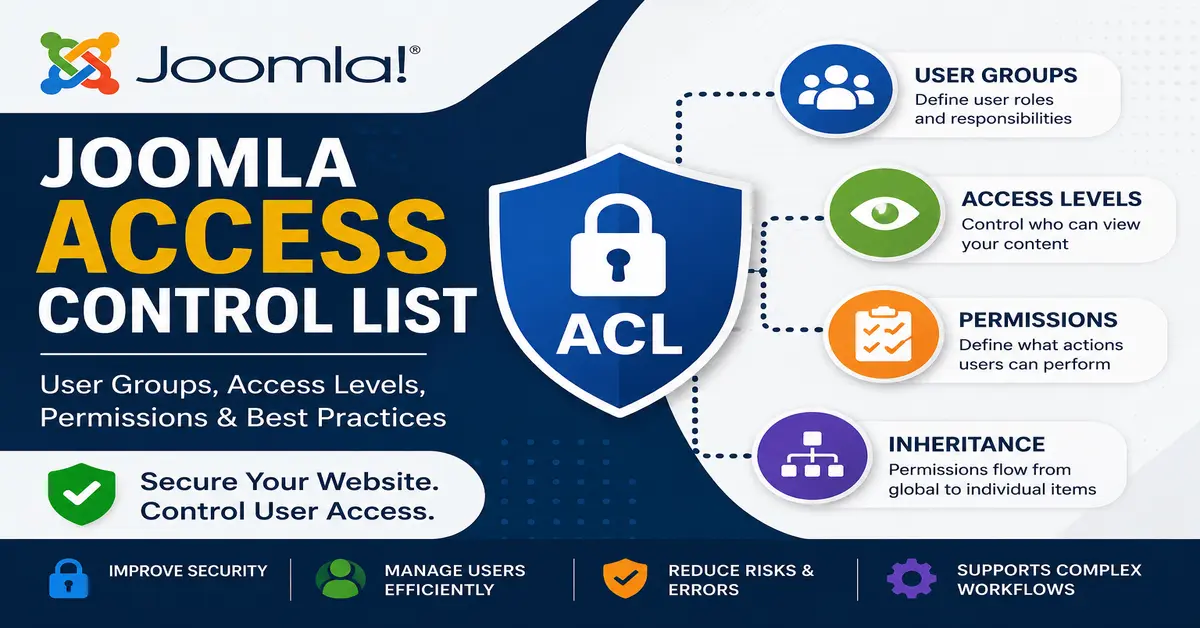
Joomla Access Control List (ACL) is Joomla’s built-in permission management system. It controls which users can access specific areas of your website and determines what actions they are allowed to perform.
Instead of assigning permissions directly to every user, Joomla uses user groups and access levels. This makes it much easier to manage websites with many users.
For example:
- An Author can create articles.
- An Editor can edit any article.
- A Publisher can publish articles.
- An Administrator can manage website settings.
- A Super User has complete control over the website.
This structured permission system makes Joomla suitable for websites of all sizes.
Why is Joomla ACL Important?
Without proper permission management, users may accidentally delete important content or access sensitive information.
Using Joomla ACL provides several advantages:
- Improves website security.
- Protects confidential content.
- Allows multiple users to work safely.
- Reduces human errors.
- Makes website management easier.
- Supports complex business workflows.
Instead of giving everyone administrator access, you can provide only the permissions they actually need.
1. User Groups
User Groups define who the user is.
Every Joomla user belongs to one or more user groups. These groups determine the permissions available to that user.
Some default Joomla user groups include:
- Public
- Guest
- Registered
- Author
- Editor
- Publisher
- Manager
- Administrator
- Super Users
You can also create your own custom user groups based on your website requirements. Before configuring permissions in Joomla Access Control List (ACL), it’s important to understand how Joomla User Groups work. User Groups define the roles assigned to users, while ACL determines the actions each group can perform. Understanding User Groups makes it much easier to configure permissions correctly.
2. Access Levels
Access Levels define what users can view.
Even if a user has permission to edit content, they may not be allowed to view certain menu items, articles, or modules unless their access level allows it.
Common access levels include:
- Public
- Guest
- Registered
- Special
- Custom Access Levels
Access Levels control visibility, while permissions control actions.
If you’re unsure about the difference between permissions and visibility, read our detailed guide on Joomla Access Levels. Access Levels control who can view content, whereas ACL permissions determine what actions users are allowed to perform.
3. Permissions
Permissions define what actions users can perform.
Joomla provides many permission types, including:
- Login to Site
- Login to Administrator
- Create Content
- Edit Content
- Edit Own Content
- Edit State
- Delete Content
- Access Component
- Configure Website
Permissions can be assigned globally or for individual components, categories, and even specific items.
The official Joomla Access Control List documentation provides detailed technical information about permissions, inheritance, and advanced ACL configuration. It’s an excellent resource for both beginners and experienced Joomla developers.
How Joomla ACL Works
Joomla ACL follows a simple workflow.
- Create or use an existing User Group.
- Assign permissions to that User Group.
- Create an Access Level if content visibility needs to be controlled.
- Add users to the appropriate User Group.
- Assign Access Levels to menu items, modules, categories, or articles.
This separation between permissions and visibility makes Joomla one of the most flexible CMS platforms available.
For additional tutorials, administrator guides, and best practices, visit the official Joomla Documentation. It contains comprehensive information covering nearly every feature available in Joomla.
Example of Joomla ACL
Imagine you have a company website with different employees.
- Content Writers should only create articles.
- Editors should review and edit all articles.
- Marketing Team should view private reports.
- Managers should publish articles.
- Website Owner should manage everything.
Using Joomla ACL, each employee receives only the permissions needed for their role.
This minimizes security risks while keeping the workflow organized.
Difference Between User Groups and Access Levels
| User Groups | Access Levels |
|---|---|
| Define user roles | Define content visibility |
| Control permissions | Control who can view content |
| Assigned to users | Assigned to articles, menus, modules |
| Can inherit permissions | Contain one or more user groups |
Many beginners confuse these two concepts, but they serve completely different purposes.
Many beginners confuse User Groups with Access Levels. To understand the differences with practical examples, check out our complete tutorial on Joomla User Groups vs Access Levels. This guide explains how both features work together within Joomla ACL.
Permission Inheritance in Joomla
One of Joomla’s most powerful ACL features is permission inheritance.
Permissions assigned at the Global Configuration level automatically flow down to:
- Components
- Categories
- Articles
- Menu Items
- Modules
You can override inherited permissions whenever necessary.
This approach reduces repetitive configuration and keeps permission management simple.
Best Practices for Joomla Access Control List
- Use the principle of least privilege.
- Create custom user groups only when necessary.
- Avoid giving Administrator access to everyone.
- Test permissions with sample accounts.
- Use meaningful names for custom groups.
- Review permissions regularly.
- Keep Joomla updated for better security.
Following these practices helps maintain a secure and well-organized Joomla website.
Common ACL Mistakes
Many Joomla beginners experience permission issues because of simple configuration mistakes.
Common mistakes include:
- Confusing User Groups with Access Levels.
- Assigning users to the wrong group.
- Overriding inherited permissions unnecessarily.
- Giving users more permissions than required.
- Forgetting to configure menu item access levels.
Understanding how ACL works helps avoid these problems.
If you’re new to Joomla, you may want to start with our complete Joomla installation guide. Once your website is ready, you can configure Joomla Access Control List to manage users and permissions securely.
Conclusion
The Joomla Access Control List is one of Joomla’s strongest features. It provides complete control over user permissions and content visibility while keeping your website secure.
By understanding User Groups, Access Levels, Permissions, and Inheritance, you can create a flexible permission system that fits websites of any size.
Whether you’re running a personal blog or managing hundreds of users on a large business website, mastering Joomla ACL will make administration easier, improve security, and help your team work more efficiently.
To download the latest version of Joomla or learn about new features, visit the official Joomla website. Keeping your website updated ensures better security, performance, and compatibility.
Frequently Asked Questions
What is Joomla Access Control List (ACL)?
Joomla Access Control List (ACL) is Joomla’s permission system that controls what users can access and what actions they are allowed to perform on the website.
What is the difference between User Groups and Access Levels?
User Groups determine user permissions, while Access Levels determine which content users are allowed to view.
Can I create custom User Groups in Joomla?
Yes. Joomla allows you to create unlimited custom User Groups and assign custom permissions based on your website’s requirements.
Does Joomla ACL support permission inheritance?
Yes. Permissions can be inherited from Global Configuration down to components, categories, and individual items, making ACL management more efficient.
Why should I use Joomla ACL?
Using Joomla ACL improves website security, prevents unauthorized access, simplifies user management, and supports professional content workflows.
Stay updated with our latest news, special offers, and exclusive updates directly in your inbox.