Last Updated on June 7, 2026
Keeping Joomla updated is essential for website security, performance, compatibility, and access to the latest features. Regular updates help protect your website from security vulnerabilities, improve website performance, and ensure compatibility with modern hosting environments.
While Joomla includes a built-in update system, there are situations where a manual update may be necessary, such as failed updates, server restrictions, corrupted files, or websites that cannot connect to Joomla update servers.
In this guide, you’ll learn how to update Joomla safely using the Joomla Update Component and how to perform a manual Joomla update when required. Although the screenshots below were taken from Joomla 4, the update process remains very similar in Joomla 5 and Joomla 6.
Before Updating Joomla
Before updating Joomla, create a complete backup of your website files and database. A backup allows you to restore your website quickly if anything goes wrong during the update process.
We also recommend updating all installed extensions, modules, plugins, and templates before updating Joomla itself.
- Backup your website files and database.
- Update all third-party extensions.
- Verify PHP compatibility.
- Check available disk space.
- Test updates on a staging website whenever possible.
If you need help restoring a backup, read:
How to Restore Joomla Backup on Localhost
How to Update Joomla Using the Joomla Update Component
After logging into the Joomla Administrator area, Joomla automatically checks for available updates. If a newer version is available, you’ll see an update notification on the dashboard.
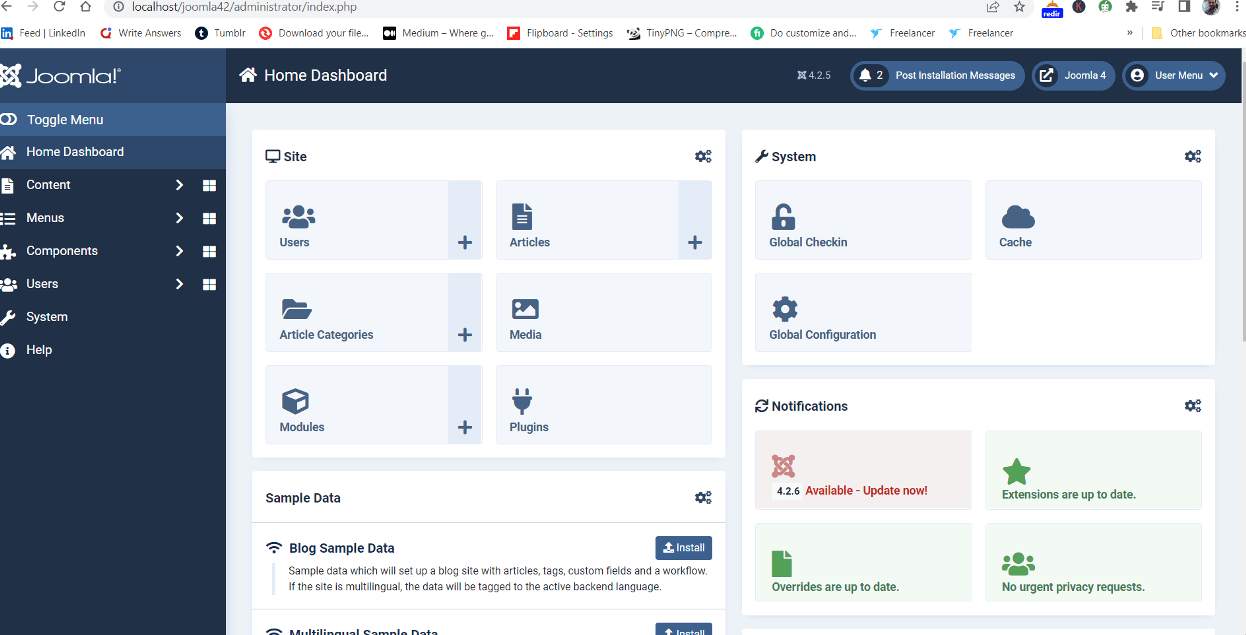
Click the update notification to open the Joomla Update page. Before proceeding, carefully review the update information and ensure your extensions are compatible with the latest Joomla version.
If you’re new to Joomla administration, check our Joomla 5 Tutorial for Beginners (2026).

Review the backup warning message carefully. Once you’ve confirmed that a backup exists and all extensions are compatible, select the confirmation checkbox and click the Start Update button.
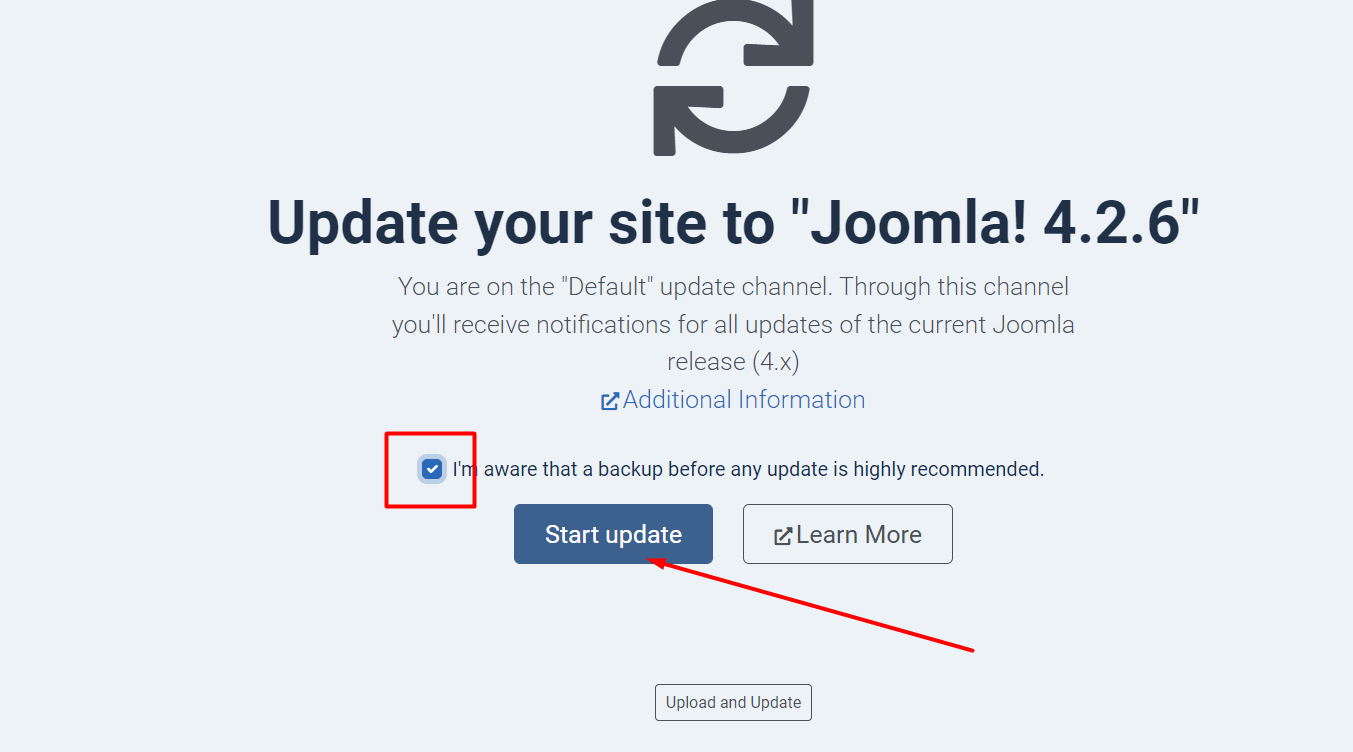
Joomla will begin downloading and installing the latest update package. During this process, avoid closing your browser window or interrupting the update. If you are installing a new Joomla on your localhost on Windows with XAMPP, I write tutorials in detail and easy steps you must review: Install Joomla 5 on Windows 11 using XAMPP

The update process may take several minutes, depending on your hosting environment and internet connection. Wait until the progress bar reaches 100%. If you are creating a new website and you have installed Joomla, then you must read this tutorial for important free Joomla extensions: Top 10 Free Joomla Extensions Every Developer Needs to Know
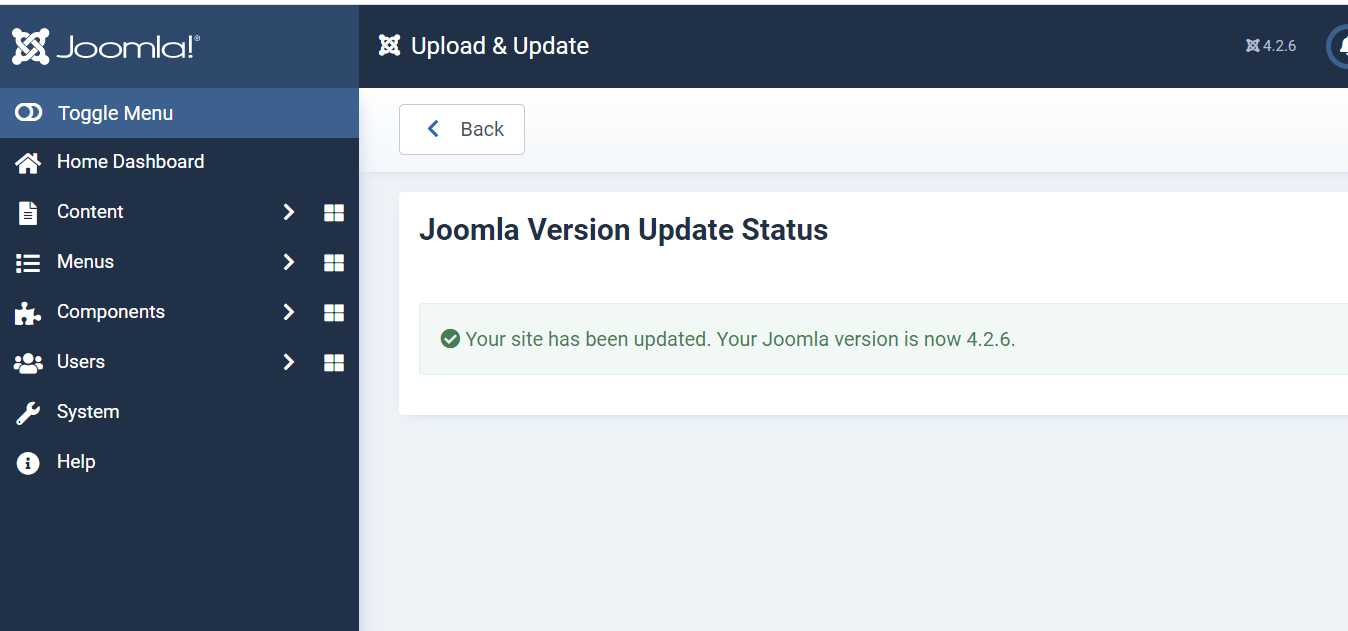
Once the update is complete, Joomla will display a success message confirming that your website has been upgraded successfully. Sometimes, after upgrading the website, it generates errors due to many reasons, like template or outdated extensions, so if you are getting errors, read our tutorial: Fix Joomla Migration Errors: A Step-by-Step Guide
How to Update Joomla Manually
If the Joomla Update Component is not working, you can manually update Joomla by uploading the latest update package.
- Download the latest Joomla Update Package from the official Joomla website.
- Create a full backup of your website.
- Upload the update package using Joomla’s Upload & Update feature or via FTP.
- Overwrite existing Joomla core files.
- Log in to the Joomla Administrator.
- Navigate to System → Maintenance → Database.
- Click Update Structure if Joomla reports database changes.
- Clear Joomla cache and browser cache.
- Test your website functionality.
For official downloads, visit: Joomla Downloads
What to Do After Updating Joomla
- Clear Joomla cache.
- Clear browser cache.
- Test frontend functionality.
- Test administrator login.
- Check extension compatibility.
- Verify menu functionality.
- Test contact forms and custom features.
- Review database status under System → Maintenance → Database.
You may also find these guides helpful:
- Joomla SEO Checklist 2026: 15 Proven Steps to Rank Higher Fast
- 5 Best Sitemap Plugins for Joomla 4 & 5 (2026 Guide)
- Complete Joomla 6 Beginner Guide (Step-by-Step)
Conclusion
Keeping Joomla updated is one of the most important maintenance tasks for any website owner. Regular updates improve security, performance, compatibility, and overall website stability.
Whether you use the Joomla Update Component or perform a manual update, always create a backup first and verify extension compatibility before proceeding. Following these best practices will help ensure a smooth and successful Joomla update experience.
Frequently Asked Questions
Can I manually update Joomla 5?
Yes. Joomla 5 can be updated manually by uploading the latest update package and updating the database structure.
Can I manually update Joomla 6?
Yes. Joomla 6 supports both automatic and manual updates.
Will I lose my content during a Joomla update?
No. A Joomla core update does not normally affect your articles, menus, users, or media files.
Why is my Joomla update failing?
Common causes include incompatible extensions, insufficient server resources, corrupted files, or database structure issues.
How often should I update Joomla?
You should install Joomla security and maintenance updates as soon as they become available to keep your website secure and stable.
Stay updated with our latest news, special offers, and exclusive updates directly in your inbox.