Last Updated on October 2, 2026
Joomla has continued to evolve with each major release, bringing improvements to security, performance, administration, accessibility, developer tools, and content management. If you are comparing Joomla 6 vs Joomla 5, the difference is not simply about a new version number. Joomla 6 continues the modern architecture introduced in Joomla 5 while adding new features and improving compatibility, usability, and website management.
Joomla 6 is currently the supported major release series, while Joomla 5 remains supported for security updates. The latest releases are Joomla 6.1.4 and Joomla 5.4.9.
This guide explains the major differences between Joomla 6 and Joomla 5, including the user interface, templates, media management, workflows, security, PHP requirements, automatic updates, extension compatibility, and the Joomla 5 to Joomla 6 upgrade process.
Joomla 6 Migration Problems: Common Issues and Fixes
Joomla 6 vs Joomla 5: What’s the Difference?
Joomla 5 introduced a modern foundation with improved performance, security, accessibility, and developer features. Joomla 6 builds on that foundation rather than introducing a completely different CMS.
For many websites, upgrading from Joomla 5.4 to Joomla 6 is an upgrade rather than a traditional migration. Joomla’s documentation explains that Joomla 5 extensions that have removed deprecated code and use current Joomla APIs can work with Joomla 6, while many other extensions can work with the Joomla 6 backward compatibility plugin.
Here are some of the most important differences to understand before upgrading.
Joomla 6 vs Joomla 5: Quick Comparison
| Feature | Joomla 5 | Joomla 6 |
|---|---|---|
| Current major series | 5.x | 6.x |
| Default frontend template | Cassiopeia | Cassiopeia |
| Administration template | Atum | Atum |
| PHP requirement | PHP 8.1 minimum | PHP 8.3 minimum |
| Automatic core updates | Available in the 5.x series | Available for supported minor and patch updates |
| Workflow management | Workflow system | Visual Workflow Editor added in Joomla 6.1 |
| Media custom fields | Existing media field functionality | Audio, video and document media field options |
| Module versioning | Not available as the Joomla 6 feature | Available in Joomla 6.1 |
| Multilingual module associations | Limited compared with Joomla 6.1 | Available in Joomla 6.1 |
| Proof-of-Work CAPTCHA | Not included as a Joomla 6.1 feature | Built-in Proof-of-Work CAPTCHA |
1. Joomla 5 vs Joomla 6: Modern Frontend and Template System
One important point when comparing Joomla 6 with Joomla 5 is that Joomla 6 does not replace the default frontend template with a completely different template.
Both Joomla 5 and Joomla 6 use Cassiopeia as the default frontend template. This means websites that already use Cassiopeia do not need to change their entire frontend design simply because they upgrade from Joomla 5 to Joomla 6. Joomla’s official Joomla 5-to-6 upgrade documentation specifically notes that Cassiopeia remains the frontend template in Joomla 6.
The important difference is therefore not simply Bootstrap version changes. Modern Joomla versions focus more broadly on accessible, responsive templates, the Web Asset Manager, improved frontend performance, and cleaner development practices.
2. Joomla 6 vs Joomla 5: CSS, JavaScript and Developer Improvements
The original version of this article compared LESS and SASS and described Joomla 4 in terms of Bootstrap 4. Those details are now outdated and should not be used as the main comparison between Joomla 5 and Joomla 6.
Modern Joomla development uses a more flexible asset-management approach. Joomla’s Web Asset Manager allows developers to register and load CSS and JavaScript assets in a controlled way instead of unnecessarily loading every asset on every page.
This is particularly important for performance because a Joomla website can load only the assets required by a particular component, module, or template.
For developers, Joomla 6 continues the modern codebase introduced in Joomla 5 and removes or deprecates older APIs as part of the ongoing modernization of the CMS.
How to Upgrade Joomla 4 to Joomla 5 (Step-by-Step Guide 2026)
3. Joomla 6 vs Joomla 5: Responsive and Accessible Design
Responsive design is now expected for virtually every modern website, so the comparison between Joomla 5 and Joomla 6 is less about whether the CMS supports responsive layouts and more about how the platform continues to improve accessibility and frontend performance.
Joomla 5 already provides a modern responsive foundation through Cassiopeia and its asset-management system. Joomla 6 continues that approach and adds further improvements to administration, content editing, and accessibility.
Joomla 6.1 also adds an abbreviation feature to TinyMCE, helping content editors create semantically correct abbreviation markup and improving accessibility when appropriate.
4. Joomla 5 vs Joomla 6: Cassiopeia Frontend Template
The original article compared Joomla 3’s Beez3 and Protostar templates with Joomla 4’s Cassiopeia. That comparison is no longer relevant to a current Joomla 6 article because Joomla 3 and Joomla 4 are unsupported.
Joomla 5 and Joomla 6 both use Cassiopeia as the default frontend template. Joomla 6 does not require you to replace Cassiopeia simply because you upgraded from Joomla 5.
This original screenshot is retained for historical reference. It shows the older Joomla 3 frontend and should not be interpreted as a current Joomla 5 or Joomla 6 template comparison.
For a current website, Cassiopeia remains an important part of the Joomla 5 and Joomla 6 frontend experience.
5. Joomla 6 vs Joomla 5: Administration Interface
Joomla 5 and Joomla 6 both use the Atum administration template. Joomla 6 continues to use the modern administration experience introduced in the Joomla 4 generation and developed further through Joomla 5 and Joomla 6.
One of the more notable Joomla 6.1 improvements is the Visual Workflow Editor, which provides a graphical view of the content publication workflow. This can make complex publishing processes easier to understand and manage.
6. Joomla 6 Installation and Upgrade Process
The Joomla installation process has changed significantly since Joomla 3, but the more important consideration today is the difference between installing Joomla 6 on a new website and upgrading an existing Joomla 5 website.
For a new website, Joomla 6 can be installed using the current Joomla installation package. The official Joomla project also provides a way to launch a Joomla website for testing through launch.joomla.org.
For an existing Joomla 5 website, Joomla 5.4.x can be upgraded to Joomla 6.x after checking the server requirements, extensions, templates, custom code, and backward compatibility requirements. Joomla recommends testing the upgrade on a copy of the production website before performing it on the live site.
7. Joomla 6 Media Manager and Media Custom Fields
The Media Manager has evolved considerably since Joomla 3 and Joomla 4. The original article described image editing features such as crop, resize, rotate, and rename as Joomla 4 innovations. Those features are now part of the historical development of Joomla and should not be presented as new Joomla 6 features.
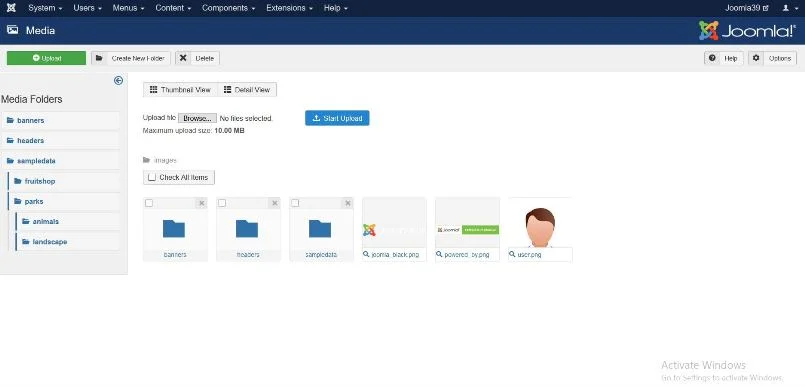
Joomla 5 and Joomla 6 provide a much more capable media-management environment. Joomla 6.1 adds another useful improvement through new Media Custom Field options for audio, video, and documents. These allow content editors to work with more types of media through custom fields instead of being limited to image-based fields.
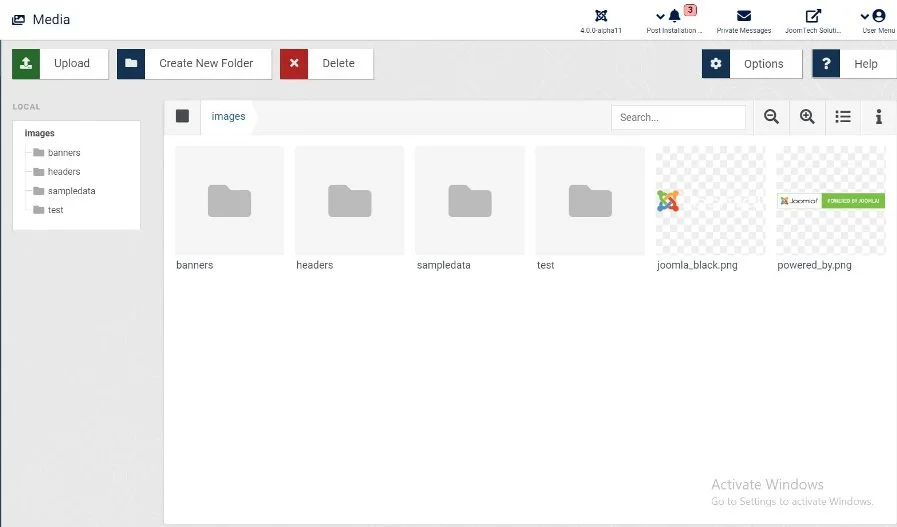
These original Joomla 4 screenshots are retained for reference, while the current comparison focuses on the features available in Joomla 5 and Joomla 6.
8. Joomla 6 vs Joomla 5: PHP and Server Requirements
One of the most important technical differences between Joomla 5 and Joomla 6 is the minimum supported server environment.
Joomla 5 requires PHP 8.1 or newer, while Joomla 6 requires PHP 8.3 or newer. Joomla 6 also requires MySQL 8.0.13 or newer, MariaDB 10.6 or newer, or PostgreSQL 14 or newer. The recommended PHP version for Joomla 6 is currently PHP 8.4.
| Requirement | Joomla 5 | Joomla 6 |
|---|---|---|
| PHP | 8.1 minimum | 8.3 minimum |
| Recommended PHP | 8.3 | 8.4 |
| MySQL | 8.0.13 minimum | 8.0.13 minimum |
| MariaDB | 10.4 minimum | 10.6 minimum |
| PostgreSQL | 12 minimum | 14 minimum |
Therefore, before upgrading from Joomla 5 to Joomla 6, check your hosting environment carefully. If your server is running an older PHP version, the Joomla 6 upgrade may not be available until the hosting environment is updated.
9. Joomla 6 vs Joomla 5: JavaScript, APIs and Backward Compatibility
The original article stated that Joomla 4 removed jQuery and rewrote the core in vanilla JavaScript. That statement is too broad and is not an appropriate way to describe the current Joomla 5 versus Joomla 6 architecture.
The more important issue for Joomla 5 users is extension compatibility.
Joomla 6 removes deprecated code and continues the modernization of the Joomla API. Extensions that have been updated to remove deprecated Joomla code are more likely to work without compatibility assistance. Other extensions may require the Behaviour – Backward Compatibility 6 plugin.
Before upgrading, check every third-party extension, template, plugin, and custom development project used by your website. Joomla’s documentation recommends testing the complete site on a development copy before upgrading the production website.
10. Joomla 6 Performance and Optimization
Performance should not be reduced to a claim such as “Joomla 6 is two times faster than Joomla 5.” Actual website performance depends on the template, extensions, hosting environment, database configuration, images, caching, third-party scripts, and the way the site is developed.
Instead, Joomla 6 continues to provide a modern foundation for building fast websites. Joomla’s current feature information highlights fast-loading templates, the Web Asset Manager, caching options, CDN support, and other performance-related capabilities.
For a real Joomla website, performance optimization should include:
- Using a lightweight template
- Keeping extensions updated
- Removing unnecessary extensions and plugins
- Optimizing images
- Using appropriate page and site caching
- Reducing unnecessary JavaScript and CSS
- Using a suitable PHP version
- Choosing reliable hosting
- Using a CDN when appropriate
This approach is more useful than assigning a fixed performance multiplier to Joomla 6.
11. Joomla 6 vs Joomla 5: Security Improvements
Security is one of the most important reasons to keep Joomla and its extensions up to date.
Joomla 6 continues the security improvements introduced in Joomla 5 and receives regular security and bug-fix releases. The latest Joomla 6.1.4 release included security fixes, including fixes related to cross-site scripting, unauthorized account creation, and access-control checks for Web Services API endpoints.
Joomla 6 also raises the minimum supported software requirements, which helps the platform move away from older server environments.
However, installing Joomla 6 alone does not guarantee that a website is secure. Third-party extensions, templates, hosting configuration, administrator accounts, passwords, backups, and custom code also affect website security.
12. Joomla 6.1 New Features
If you are specifically interested in the latest Joomla 6 improvements, Joomla 6.1 introduced several features beyond the Joomla 5 feature set.
Proof-of-Work CAPTCHA
Joomla 6.1 introduces a built-in Proof-of-Work CAPTCHA designed to help protect forms from automated spam without requiring an external CAPTCHA service or API.
Visual Workflow Editor
The Visual Workflow Editor provides a graphical representation of content workflows, making it easier to understand and manage publication processes.
Media Custom Fields
Joomla 6.1 adds media custom-field options for audio, video, and documents. This gives content managers more flexibility when creating structured content.
Module Versioning
Joomla 6.1 extends version history to modules. Administrators can enable module versioning and then view, compare, and restore previous versions of module content.
Multilingual Module Associations
Multilingual websites can now associate module instances across languages, making it easier to manage related modules in different language versions of a website.
13. Joomla 5 to Joomla 6 Upgrade: What Should You Check?
If your website is already running Joomla 5.4.x, upgrading to Joomla 6 is generally more straightforward than older Joomla major-version migrations. However, you should still prepare carefully.
Before starting the upgrade:
- Make a complete backup of the website and database.
- Update Joomla 5 to the latest available 5.4.x release.
- Check the PHP version and database requirements.
- Update Joomla extensions and templates.
- Check every extension for Joomla 6 compatibility.
- Review custom code for deprecated Joomla APIs.
- Test the website on a staging site, subdomain, or local environment.
- Check the Joomla pre-update information before proceeding.
- Test the frontend and administrator area after the upgrade.
- Only then perform the upgrade on the production website.
Joomla’s official documentation specifically recommends testing the upgrade on a copy of the production website. The Joomla 5-to-6 process also requires attention to backward-compatibility plugins and extension compatibility.
14. Should You Upgrade from Joomla 5 to Joomla 6?
If you are running Joomla 5.4.x, Joomla 6 is the current major release series and is the direction of the Joomla project. However, an upgrade should be planned around your website’s extensions, template, custom code, and hosting environment rather than performed simply because a new major version exists.
Joomla 5.4.x remains supported for security updates through October 2027, while Joomla 6 is currently the supported major release series through October 2029 for security fixes.
For a simple Joomla 5 website using compatible extensions and a current template, the upgrade can be relatively straightforward. For a complex website with custom extensions or older third-party software, more testing may be necessary.
Joomla 5 vs Joomla 6: Which Version Should You Use?
For a new Joomla website, Joomla 6 is the current major release series and is the natural version to evaluate first. Joomla’s current documentation lists Joomla 6 as the recommended version for new installations.
If you already have a Joomla 5 website, there is no need to treat the upgrade as a simple one-click decision. First, check your hosting environment, extensions, templates, and custom code, then test the upgrade on a copy of the website.
The key difference is that Joomla 6 builds on the foundation of Joomla 5 while introducing additional features and continuing the removal of deprecated code. For many Joomla 5.4 websites, the upgrade path is considerably simpler than the historical Joomla 3-to-Joomla 4 or Joomla 4-to-Joomla 5 migrations.
Frequently Asked Questions About Joomla 6 vs Joomla 5
Is Joomla 6 better than Joomla 5?
Joomla 6 is the newer major release series and includes additional features, updated technical requirements, and continued improvements to the Joomla codebase. However, whether you should upgrade depends on your website’s extensions, templates, custom code, and hosting environment.
Can I upgrade Joomla 5 directly to Joomla 6?
Yes. Joomla 5.4.x can be upgraded to Joomla 6.x after checking the technical requirements and extension compatibility. Joomla describes the Joomla 5.4 to Joomla 6 process as an upgrade rather than a traditional migration. Testing on a copy of the production website is recommended before upgrading the live site.
What PHP version does Joomla 6 require?
Joomla 6 requires PHP 8.3 or newer. Joomla’s current technical requirements also recommend PHP 8.4. Your database and web server must meet the Joomla 6 requirements as well.
What are the main new features in Joomla 6.1?
Joomla 6.1 introduces features including Proof-of-Work CAPTCHA, the Visual Workflow Editor, media custom fields for audio, video and documents, module versioning, and multilingual module associations.
Will my Joomla 5 extensions work with Joomla 6?
Many Joomla 5 extensions can work with Joomla 6, but compatibility depends on whether the extension has removed deprecated code and follows current Joomla APIs. Some extensions may require the Behaviour – Backward Compatibility 6 plugin. Always check extension compatibility and test the complete website before upgrading.
Conclusion
The comparison between Joomla 6 vs Joomla 5 is very different from older Joomla version comparisons. Joomla 6 does not completely redesign the platform; instead, it builds on the modern foundation established by Joomla 5 and adds new capabilities for content management, workflows, media, security, compatibility, and administration.
For new websites, Joomla 6 is the current major release series. For existing Joomla 5.4 websites, the upgrade path is designed to be manageable, but extension and custom-code compatibility should always be checked before upgrading.
If you are planning a Joomla 5 to Joomla 6 upgrade, testing the website on a staging environment or local installation first is one of the most important steps you can take.
Looking for help with a Joomla 5 to Joomla 6 upgrade? A proper upgrade should include a full backup, extension compatibility check, custom-code review, staging test, upgrade, and post-upgrade testing.
Stay updated with our latest news, special offers, and exclusive updates directly in your inbox.