Last Updated on August 5, 2024
In this article, we have explained Fixed-Price jobs covered by the Upwork guarantee covered all points related to fixed-price job payment protection, So you have to read the complete article where you can see more important question’s answers.
Upwork Fixed-Price Protection has used escrow to help ensure that your clients receive the work they’ve requested and that you are compensated for the finished job. Clients that make fixed-price offers put a milestone payment into escrow before you start working under this arrangement. The minimum payment for a milestone is $5. Your client releases money to you after receiving and approving the job.
Contracts with Fixed Price Jobs
Let See: What is Hourly Protection on Upwork?
Fixed-price contracts can be tracked using the Upwork Desktop App, however, they are only eligible for Fixed-Price Protection, not Hourly Protection.
To enable tracking for fixed-price contracts, go here.
- From the menu, select the Settings option.

- Choose Advanced from the drop-down menu.

- On fixed-price projects, enable track time.
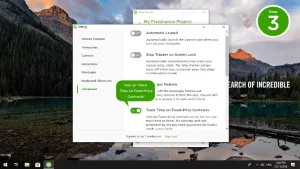
Important: Time logged on fixed-priced contracts is purely for tracking purposes and will not be added to your total work hours on your profile.
Milestones must be defined and pre-funded.
You and your client will agree on key work milestones and how much you’ll be paid for completing them before any work begins.
- You can either define, submit, and be paid for one chunk of work at a time, or you can plan out all milestones in advance.
- A small initial milestone might be a smart practice for larger projects, allowing you and your client to work together and develop each other’s trust before moving on with the project.
- Your client will pre-fund the payment for a milestone into an escrow account before you begin working on it. The minimum payment for a milestone is $5.
- This escrow deposit is collected to ensure your client’s ability to pay, but payment is contingent on your client’s happiness with your work.
- Please keep in mind that only the money stored in escrow is safe. Upwork cannot assist you in obtaining monies that have been promised but not paid into escrow. As a result, it’s critical that the money placed in escrow is appropriate for the work you’ll do for that milestone.
Work must be submitted.
Please plan ahead of time with your client how you will send your files or other work product. You can utilize Upwork’s collaboration capabilities to transmit files, or you can use whichever third-party solutions you choose.
To submit a milestone for review
Let See: Overview of a Professional Upwork Profile
- Navigate to My Jobs and select Obtain Milestone Approval
- Send a note to your client outlining the scope of the project.
- You can also send an attachment or a link to the work. This isn’t needed, but it’s critical that your client has a way to assess your work once you submit it for approval.
- Submit the request by clicking the Submit Request button. Your client will be alerted that work has been submitted for their approval. When they authorize payment or a request, you will be alerted.
Milestones must be reviewed and approved.
Your client will review your work and either accept or request revisions once you’ve submitted it.
- The client has 14 days to review and approve or request adjustments after the most recent milestone submission. When you get approval, the money comes out of escrow and goes to you.
- The money is automatically released to you if your client does not respond to any milestone submission within 14 days.
- If a client refuses to release payments for a completed milestone, you can submit an escrow dispute. Unless you accept their return or go through dispute resolution, escrowed monies will not be released to the client.
- Important: If you re-submit a milestone, the process above will start all over again, and your c will be reset.
How to Get Fixed-Price Protection
Let See: Upwork Profile Overview Sample for Virtual Assistant
Fixed-Price jobs covered by the Upwork guarantee cover all escrowed funds.
- Milestone payments in excess of the amount in escrow, cash from unverified payment methods, and additional amounts agreed or promised between you and your client are not covered by protection.
- More information, including our Escrow Dispute Assistance Policy, can be found in the Fixed-Price Escrow Instructions.

Let See:
- Top 10 Upwork Mistakes Made by New Freelancers
- Most demanding skills on Upwork
- How do you write a proposal for Upwork
Stay updated with our latest news, special offers, and exclusive updates directly in your inbox.