Last Updated on August 2, 2026
Want to keep your visitors engaged even after they leave your website? A website push notification is one of the most effective ways to bring users back by sending instant alerts directly to their browser whenever you publish new content, launch a product, or announce an update.
Unlike email marketing, users don’t need to provide their email address. They simply click Allow when prompted, and they can receive notifications even when your website isn’t open.
In this guide, you’ll learn how to add free website push notifications using Webpushr. We’ll also explain how web push notifications work and why they are important for modern websites.
What Is a Website Push Notification?
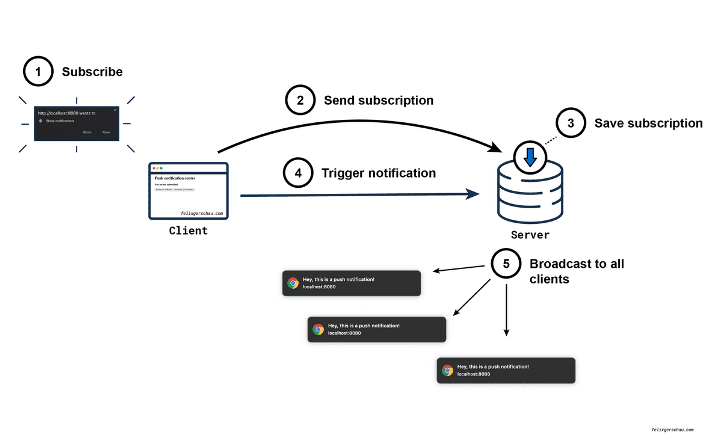
Image Credit: Webpushr
A website push notification is a clickable message sent directly to a visitor’s web browser after they subscribe to your website. These notifications can be used to inform users about:
- New blog posts
- Latest products
- Special offers and discounts
- Breaking news
- Important announcements
- Website updates
The biggest advantage is that subscribers receive notifications even when your website is closed, making web push notifications an excellent tool for increasing traffic and user engagement.
Related: How do you create a website on SITE123 free of cost?
How Do Web Push Notifications Work?
Modern browsers support web push notifications through three core technologies:
- Notification API
- Push API
- Service Workers
These technologies work together to deliver notifications securely and efficiently.
1. Notification API
The Notification API allows websites to display notifications while a visitor is actively browsing your website.
Example:
if ('Notification' in window) {
  if (window.Notification.permission === 'granted') {
    new window.Notification('Time is over!');
  }
}
2. Push API
The Push API allows your server to send notifications to subscribed users, even when your website is not open. It works together with Service Workers to receive messages in the background.
3. Service Workers
A Service Worker is a JavaScript file that runs independently from your web page. It enables offline functionality, background synchronization, and browser push notifications.
Without a Service Worker, browser push notifications cannot function properly.
Benefits of Website Push Notifications
- Increase returning visitors
- Improve user engagement
- Boost blog traffic instantly
- No email address required
- Higher click-through rates than email marketing
- Works on desktop and Android browsers
- Easy to automate notifications for new content
Best Free Website Push Notification Services
There are many push notification platforms available today. Most offer a free plan for small websites and premium plans for growing businesses.
- Webpushr
- OneSignal
- PushEngage
- Airship
- SendPulse
Among these, Webpushr is one of the easiest solutions for beginners because it offers generous free features and simple integration.
How to Add Free Website Push Notification Using Webpushr
Setting up Webpushr takes only a few minutes. Follow these steps.
Step 1: Create a Free Webpushr Account
Visit https://www.webpushr.com and create your free account.

Registration requires only basic website information.
Step 2: Log In
After verifying your account, log in to the Webpushr dashboard.
Step 3: Add Your Website

Enter your website details:
- Select your website platform.
- Enter your website name.
- Enter your website URL.
- Select whether your website uses HTTPS.
- Upload your website logo or notification icon.
- Click Next.
Step 4: Install Webpushr
Now complete the integration.
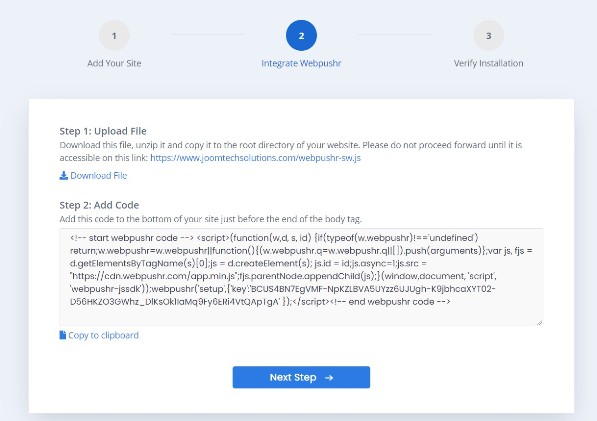
Upload the Service Worker File
Download the Service Worker ZIP file from Webpushr, extract it, and upload webpushr-sw.js to the root directory of your website.
Verify that it is accessible using:
https://yourdomain.com/webpushr-sw.js
Add the JavaScript Code
Copy the JavaScript code provided by Webpushr and paste it just before the closing </body> tag of your website.
This code initializes the push notification service and displays the subscription prompt to visitors.
Step 5: Verify the Installation
Open your website in a supported browser. If everything has been configured correctly, you’ll see the notification permission popup.
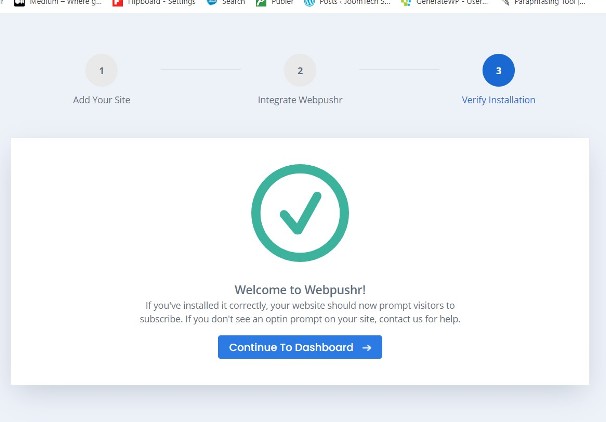
Once users click Allow, they’ll become subscribers and can receive future browser notifications.
Best Practices for Website Push Notifications
- Send only useful and relevant notifications.
- Avoid sending too many notifications each day.
- Use engaging titles with clear calls to action.
- Segment your subscribers whenever possible.
- Track click-through rates to improve performance.
- Always use HTTPS for better browser compatibility.
Conclusion
Adding a website push notification system is one of the easiest ways to increase returning visitors and keep your audience informed about your latest content.
Webpushr offers a simple setup process, a generous free plan, and excellent browser compatibility, making it a great choice for bloggers, businesses, and developers.
If you encounter any issues during installation, feel free to leave a comment. We’ll be happy to help.
Related:
Frequently Asked Questions
What is a website push notification?
A website push notification is a browser message sent to subscribed users to notify them about new posts, offers, updates, or announcements even when they are not browsing the website.
Are website push notifications free?
Yes. Many services such as Webpushr offer free plans that are suitable for blogs, small businesses, and personal websites.
Do website push notifications work on mobile devices?
Yes. They work on Android browsers and desktop browsers. Support on iOS is available for modern Safari versions.
Do I need HTTPS to enable push notifications?
Yes. Most browsers require HTTPS to securely deliver website push notifications.
Which is the best free website push notification service?
Webpushr, OneSignal, PushEngage, and SendPulse are among the most popular platforms. Webpushr is an excellent choice because of its easy setup and generous free plan.
Stay updated with our latest news, special offers, and exclusive updates directly in your inbox.