Last Updated on August 9, 2026
SP Page Builder is a visual drag-and-drop website builder for Joomla that allows you to create professional web pages without writing every part of the layout manually in HTML, CSS, or JavaScript. It is designed for Joomla users who want more flexibility than the standard content editor provides.
With SP Page Builder, you can build landing pages, business websites, portfolios, service pages, homepages, and other custom layouts using a visual editor. You can add rows, columns, content elements, images, buttons, forms, galleries, and other components directly to a page and customize their appearance.
In this guide, we will explain what SP Page Builder is, how SP Page Builder works, its major features, and why it can be useful for building a Joomla website.
What Is SP Page Builder?
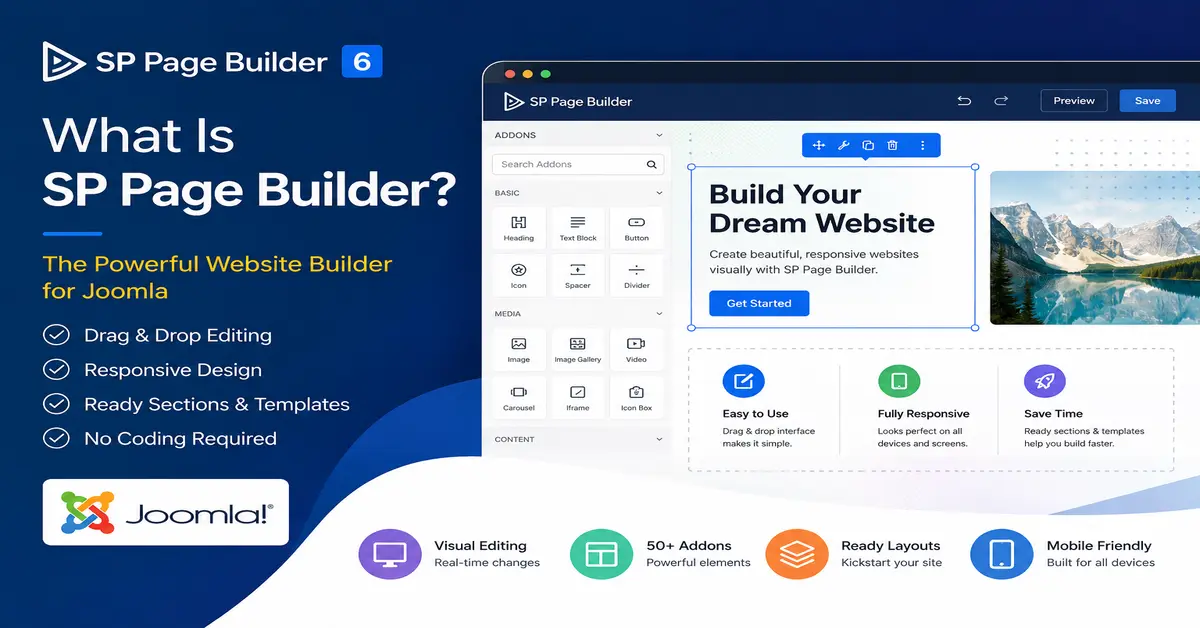
SP Page Builder is a Joomla page-building extension developed by JoomShaper. It provides a visual environment for designing Joomla pages using drag-and-drop controls instead of creating the entire page structure manually with code.
The current generation of SP Page Builder is built for modern Joomla websites and provides both front-end and back-end editing capabilities. SP Page Builder 6 also includes features for dynamic content, responsive layouts, reusable designs, media management, and integrations with Joomla functionality.
SP Page Builder is a Joomla page-building extension developed by JoomShaper. It provides a visual environment for designing Joomla pages using drag-and-drop controls. You can learn more about its current features and workflow in the SP Page Builder documentation.
For beginners, the main advantage is that you can visually create a page and immediately see how the layout looks. For developers and experienced Joomla users, it can reduce the amount of repetitive front-end work required when creating custom page layouts.
SP Page Builder: A Drag-and-Drop Website Builder for Joomla
SP Page Builder works as a visual Joomla page builder. Instead of manually writing the HTML structure for every section of a page, you can build the layout using rows, columns, and content addons.
You can start with a blank page or use a pre-designed layout and then customize it according to your requirements. This makes SP Page Builder useful for both quick website development and more customized Joomla projects.
SP Page Builder provides a visual drag-and-drop environment for creating Joomla pages. You can explore its current page-building features and available addons on the official SP Page Builder website.
If you want to compare SP Page Builder with other popular Joomla solutions, check out our guide to the best Joomla page builders, where we compare different builders based on features, ease of use, performance, and flexibility.
How Does SP Page Builder Work?
SP Page Builder uses a visual page-building approach. You can add a section to your page, divide it into columns, and then place different addons inside those columns.
For example, you can create a homepage with a hero section, heading, description, button, image, services section, testimonials, and contact form without manually creating the complete layout from scratch.
The basic workflow is simple:
- Create or edit a page using SP Page Builder.
- Add rows and columns to structure the layout.
- Drag and add the required addons or content elements.
- Add your text, images, buttons, videos, forms, and other content.
- Adjust typography, spacing, colors, alignment, and responsive settings.
- Preview the page on different screen sizes.
- Save and publish the page.
If you are new to Joomla, our Complete Joomla 6 Beginner Guide explains the fundamentals of Joomla, including installation, articles, menus, extensions, templates, SEO, security, and website management.
Quickly Build a Conversion-Focused Joomla Website
One of the main reasons to use a Joomla page builder is to reduce the time required to create custom page layouts.
Instead of manually creating every section with HTML and CSS, you can use the available addons and visual controls to build common website elements. Depending on your website requirements, these can include buttons, images, sliders, accordions, contact forms, galleries, testimonials, maps, articles, and other content elements.
This approach is particularly useful when creating landing pages or business websites where the layout needs to be changed frequently during development.
What Makes SP Page Builder Useful?
SP Page Builder combines visual editing with Joomla’s content management capabilities. Its feature set has also evolved considerably compared with older versions of the extension.
1. Visual Front-End Editing
One of the most useful features of SP Page Builder is its visual front-end editor. You can work with your page layout visually and make changes while viewing the page design.
This makes it easier to understand how different elements fit together without repeatedly switching between the Joomla administrator and a separate preview window.

2. Responsive Design Controls
A modern Joomla website needs to work properly on desktop computers, tablets, and smartphones. SP Page Builder provides responsive controls that allow you to adjust layouts and element settings for different screen sizes.
You can preview your design at different viewport sizes and adjust columns, spacing, typography, visibility, and other settings to create a better experience across devices.
Top 5 Joomla e-commerce templates
Create a Joomla Website Without Writing Everything From Scratch
Using a visual Joomla page builder does not mean that you can never use code. Rather, it gives you a faster way to create and manage common layouts while still allowing advanced users to customize their websites when necessary.
For beginners, this can make Joomla easier to approach because many common design tasks can be performed through the visual interface.

1. Drag-and-Drop Page Building
SP Page Builder provides a drag-and-drop approach for creating page layouts. You can add rows and columns and place content elements inside them to create the structure of your page.
This makes it easier to build custom layouts without manually writing the complete HTML structure for every section.
2. Ready-Made Layouts and Sections
Another useful feature is the collection of pre-designed layouts and sections. Instead of starting every page with an empty canvas, you can use an existing design as a starting point and customize it for your website.
These ready-made designs can save development time, especially when creating common website pages such as homepages, landing pages, service pages, portfolios, and business pages.
While a page builder controls many aspects of page design, your Joomla template also plays an important role in the overall appearance and layout of your website. You can explore our guide to the best free Joomla templates to find suitable templates for your project.
SP Page Builder 6 and Joomla 6
If you are working with a modern Joomla website, it is important to use a compatible version of SP Page Builder. The current SP Page Builder 6 generation is designed for modern Joomla releases, including Joomla 5 and Joomla 6.
SP Page Builder 6 also introduced significant improvements to dynamic content. Native Joomla Articles can be used with Dynamic Content, allowing developers and site owners to create dynamic article index and detail pages rather than treating every page as a completely static layout.
The newer versions have also added improvements for performance, responsive media, AI-powered workflows, Joomla integration, and other modern website-building requirements.
Dynamic Content in SP Page Builder
Dynamic Content is one of the areas where modern SP Page Builder has moved beyond the basic drag-and-drop page builder concept.
Instead of creating every piece of content manually inside individual page layouts, Dynamic Content can be used to define content structures and connect data with page designs.
This can be useful for websites that contain repeatable information such as portfolios, team members, products, directories, listings, or other structured content.
SP Page Builder 6 also supports native Joomla Articles within Dynamic Content, making it possible to create dynamic article listing and detail layouts.
More Features Available in SP Page Builder
SP Page Builder provides a broad range of tools for designing Joomla pages. Depending on the version and license you use, available features can include:
- Visual front-end editor
- Back-end page editor
- Drag-and-drop rows and columns
- Responsive design controls
- Pre-designed sections and layouts
- Reusable page layouts
- Media Manager
- Custom icons
- Font management
- Custom color palettes
- Multiple content addons
- Dynamic Content
- Joomla Articles integration
- Forms and interactive elements
- Popup and modal elements
- Page export and import
- SEO-related controls and integrations
Is SP Page Builder Good for Beginners?
Yes. SP Page Builder can be a good option for Joomla beginners who want to create custom layouts without learning every aspect of front-end development before starting their website.
The visual editor makes it possible to experiment with rows, columns, images, text, buttons, and other elements while building the page.
However, understanding basic Joomla concepts such as menus, articles, modules, categories, templates, media, and user permissions is still useful. A page builder simplifies page design; it does not replace Joomla’s underlying content management system.
Is SP Page Builder Useful for Joomla Developers?
SP Page Builder is not only for beginners. Joomla developers can also use it to speed up the development of custom layouts and client websites.
For example, a developer can use a page builder to create complex marketing pages while using custom Joomla extensions or code where more advanced functionality is required.
This combination can reduce repetitive front-end development work while retaining the flexibility of Joomla.
If you are a developer who wants complete control over the website design, you may also want to learn how to create a Joomla template from scratch.
SP Page Builder Free vs Pro
SP Page Builder is available in free and Pro versions. The exact features available in each edition can change as the product evolves, so it is a good idea to check the current JoomShaper documentation and product information before choosing a version.
If you only need basic visual page-building functionality, the free edition may be enough for some projects. More advanced websites may benefit from the additional features available in the Pro version, particularly when working with dynamic content and advanced functionality.
What Are the System Requirements?
If you are installing a current SP Page Builder 6 release, make sure your Joomla, PHP, and database environment meets the current requirements before installing or upgrading.
Current SP Page Builder documentation lists Joomla 5.x and Joomla 6.x support, along with modern PHP and database requirements. Older Joomla 3 and PHP 7 environments are no longer suitable for the current SP Page Builder 6 generation.
This is especially important when upgrading an older Joomla website. Always create a complete backup and verify the compatibility of your template and other third-party extensions before upgrading.
Before installing or upgrading SP Page Builder, check the SP Page Builder technical requirements to confirm that your Joomla, PHP, database, and hosting environment are supported.
SP Page Builder vs the Default Joomla Editor
The standard Joomla editor is useful for creating and formatting article content, but a page builder provides more control over the overall visual layout of a page.
With SP Page Builder, you can work with structured rows, columns, addons, responsive controls, reusable layouts, and visual design settings. This makes it more suitable for pages where design and layout are just as important as the text itself.
For a simple article, the standard Joomla editor may be all you need. For a highly customized homepage, landing page, or marketing page, a visual page builder can save considerable development time.
Advantages of Using SP Page Builder
- Visual editing: Build layouts without manually writing every section of code.
- Faster development: Start with ready-made layouts and sections instead of building everything from scratch.
- Responsive controls: Adjust your design for different screen sizes.
- Flexible layouts: Create rows, columns, nested layouts, and custom page structures.
- Reusable designs: Reuse layouts and sections across projects where appropriate.
- Dynamic content: Build more flexible content-driven layouts using modern SP Page Builder features.
- Joomla integration: Continue using Joomla as the CMS while gaining additional design flexibility.
Things to Consider Before Using SP Page Builder
A page builder can make website development easier, but it is still important to use it carefully.
Before installing SP Page Builder, check compatibility with your Joomla version, PHP version, template, and other extensions. If you are upgrading an older website, do not assume that an old SP Page Builder version will work correctly with the latest Joomla release.
You should also keep your page-builder extension and Joomla installation updated. Using outdated extensions can lead to compatibility, performance, and security problems.
Conclusion: Is SP Page Builder a Good Website Builder for Joomla?
SP Page Builder is a powerful website builder for Joomla that makes it easier to create visually attractive and responsive pages without manually coding every part of the layout.
Its drag-and-drop workflow is useful for beginners, while features such as responsive controls, reusable layouts, dynamic content, Joomla Articles integration, and advanced addons make it useful for experienced Joomla users and developers as well.
If you are using Joomla 5 or Joomla 6 and want more control over page design than the standard Joomla editor provides, SP Page Builder is worth considering. Just make sure you use a current compatible version and keep your Joomla website and extensions updated.
If you are new to Joomla, the official Joomla documentation is a useful resource for learning about Joomla administration, content management, extensions, and website development.
Before working with a Joomla page builder, it is helpful to understand how Joomla works internally. Our guide on what Joomla is and how Joomla architecture works explains the relationship between components, modules, plugins, templates, and the Joomla core.
Frequently Asked Questions About SP Page Builder
1. What is SP Page Builder in Joomla?
SP Page Builder is a visual drag-and-drop page builder for Joomla. It allows you to create custom page layouts using rows, columns, addons, images, buttons, forms, and other elements without manually creating the entire page structure with code.
2. Is SP Page Builder compatible with Joomla 6?
Yes. The current SP Page Builder 6 generation is designed to work with modern Joomla versions, including Joomla 6. Always check the current technical requirements before installing or upgrading.
3. Can I build a Joomla website without coding using SP Page Builder?
Yes. SP Page Builder allows you to visually create many types of Joomla pages without manually writing the HTML and CSS for every layout. However, basic Joomla knowledge is still helpful when managing the overall website.
4. Is SP Page Builder free?
SP Page Builder has a free edition as well as a Pro edition. The available features depend on the edition and current product version, so check the latest JoomShaper product information before choosing a plan.
5. Is SP Page Builder good for Joomla developers?
Yes. Joomla developers can use SP Page Builder to speed up front-end development, create complex layouts, build landing pages, and provide clients with easier visual editing while continuing to use Joomla’s core functionality and custom extensions.
Stay updated with our latest news, special offers, and exclusive updates directly in your inbox.