Last Updated on August 12, 2026
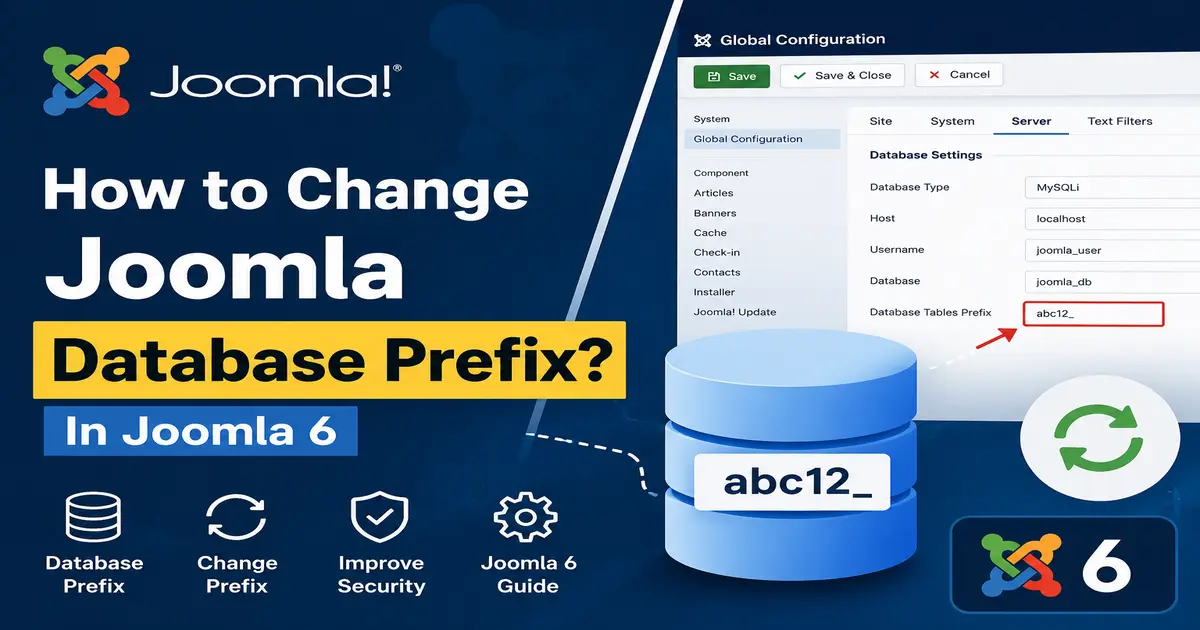
In this tutorial, we will discuss the Joomla database prefix and explain how to change the Joomla database prefix safely in Joomla 6.
The database prefix is an important part of a Joomla installation because Joomla uses it to identify the database tables belonging to your website. If you need to change the prefix on an existing Joomla website, you must update both the database table names and the prefix configured in Joomla.
Important: Changing the database prefix is an advanced database operation. Always create a complete backup of your Joomla files and database before making any changes. If possible, test the procedure on a staging or local copy first.
What Is the Joomla Database Prefix?
The Joomla database prefix is a short string placed at the beginning of the database table names used by your Joomla website.
For example, your Joomla database might contain tables like:
abc12_articles
abc12_categories
abc12_users
abc12_modules
abc12_extensions
In this example, abc12_ is the Joomla database table prefix.
The prefix helps Joomla identify the tables belonging to an installation. It also allows multiple Joomla installations to use the same database when each installation uses a different table prefix.
Why Does Joomla Use a Database Prefix?
The Joomla database prefix has several practical purposes.
Separate Multiple Joomla Installations
If multiple Joomla websites use the same database, different table prefixes can help keep their database tables separate.
Make Database Table Names Less Predictable
A custom or randomly generated prefix can make Joomla table names less obvious. However, changing the database prefix should not be considered a complete security solution.
For better Joomla security, you should also keep Joomla and its extensions updated, use strong administrator passwords, protect your hosting account, maintain reliable backups, and follow general website security best practices.
Should You Change the Joomla Database Prefix?
If you are installing a new Joomla website, it is preferable to use an appropriate database prefix during the installation process rather than changing it later.
If you already have a working Joomla 6 website, you generally do not need to change the database prefix simply for security reasons. Changing database table names can cause downtime or database errors if the process is not completed correctly.
You may have a specific reason to change it, such as moving a website, reorganizing a database, avoiding table-name conflicts, or following a particular database-management requirement.
Where Can I Find the Joomla Database Prefix?
You can find your Joomla database prefix in several ways. The easiest options are Joomla Global Configuration, the configuration.php file, and your database management tool such as phpMyAdmin.
1. Find the Database Prefix in Joomla Administrator
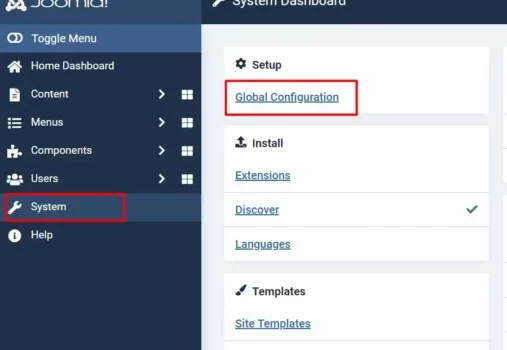
Log in to your Joomla 6 Administrator dashboard.
Go to:
System → Global Configuration
Open the Server section and locate the database settings.
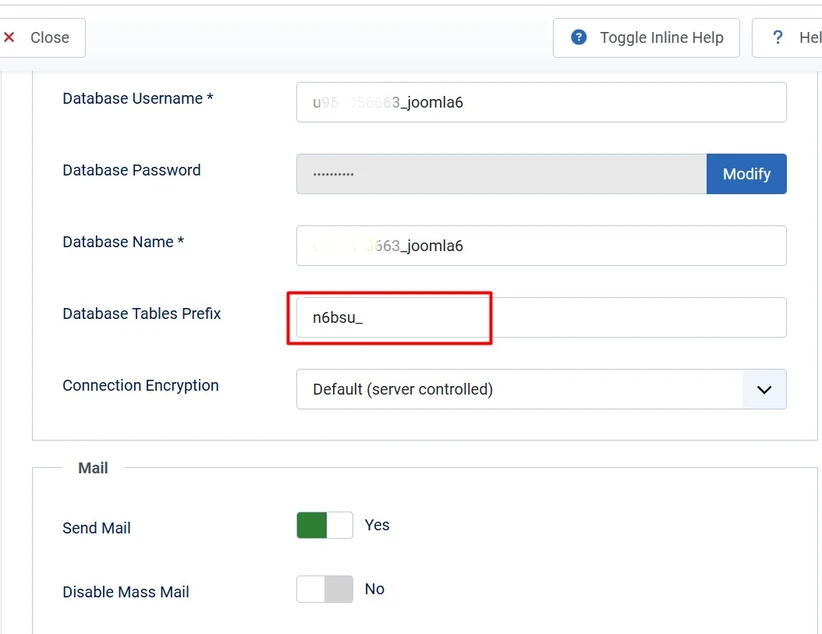
Here you can find the Database Tables Prefix value used by your Joomla installation.
For example, your prefix might look like:
n6bsu_Do not simply change this value and save the configuration. On an existing Joomla website, the database tables must also use the new prefix. If the configured prefix and actual database table names do not match, Joomla will not be able to find its tables.
Related: How to Update Joomla to the Latest Version
2. Find the Database Prefix in configuration.php

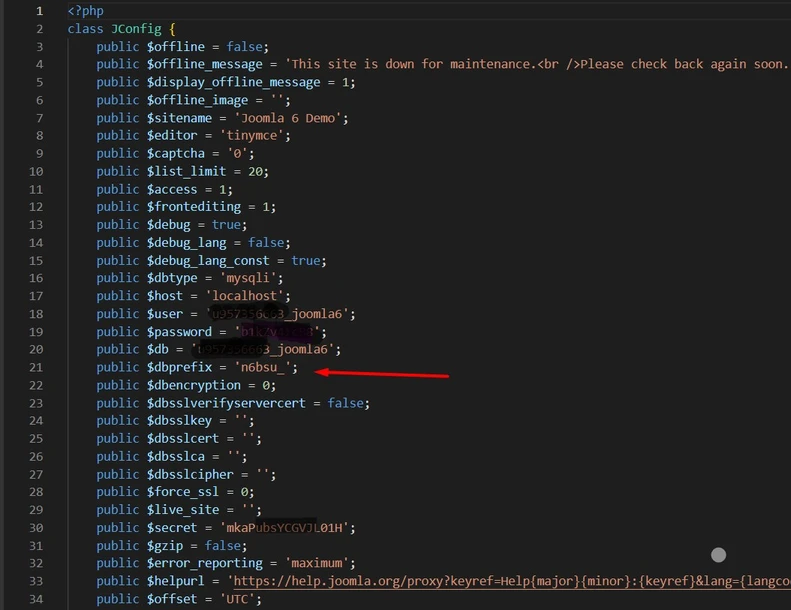
You can also find the Joomla database prefix inside the configuration.php file.
The file is located in the root directory of your Joomla installation. Depending on your hosting provider, you can access it through File Manager, SFTP, or another secure file-management method.
Open configuration.php and look for the database prefix variable:
$dbprefixYou should find a value similar to:
public $dbprefix = 'n6bsu_';The value assigned to $dbprefix is the database table prefix configured for your Joomla website.
Related: How to Connect Joomla with an SQL Server?
3. Find the Prefix Using phpMyAdmin
You can also identify the Joomla database prefix directly from the database.
Log in to your hosting control panel and open phpMyAdmin or another database management tool.
Select the database used by your Joomla 6 website. You will then see a list of database tables (this screenshot is just for example).

For example, if your database contains:
joom4_assets
joom4_categories
joom4_content
joom4_extensions
joom4_users
then joom4_ is the database prefix.
This method is particularly useful when you want to confirm that the prefix configured in Joomla matches the prefix actually used by the database tables.
Related: What Are the New Features in Joomla?
How to Change Joomla Database Prefix
Now that you know how to find the current prefix, let’s look at how to change the Joomla database prefix.
Before you begin, remember that changing the prefix involves two related operations:
- Rename the Joomla database tables to use the new prefix.
- Update the database prefix configured in Joomla.
Both must match after the change.
Step 1: Create a Complete Joomla Backup
Before changing anything in your database, create a complete backup of your Joomla website.
Your backup should include:
- All Joomla website files
- The complete Joomla database
- The current
configuration.phpfile
Do not start the process until you know that your backup can be restored.
If possible, perform the operation on a staging or localhost copy before making changes to the production website.
Step 2: Record Your Current Database Prefix
Write down the existing prefix before making any changes.
For example:
Current prefix: joom4_
New prefix: x7k9m_
This information can be useful if you need to troubleshoot the website or restore the original configuration.
Step 3: Rename the Joomla Database Tables
Log in to your database using phpMyAdmin or another database-management tool.
Select the database used by your Joomla website and identify all tables that use the current prefix.
For example:
joom4_assets
joom4_categories
joom4_content
joom4_extensions
joom4_users
You need to rename the Joomla tables so that they use the new prefix.
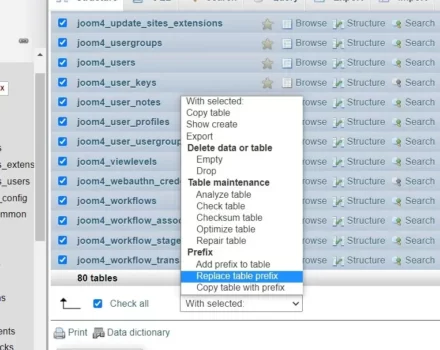
Some versions of phpMyAdmin provide tools that can help you rename tables or replace a table prefix. The exact interface depends on your phpMyAdmin version and hosting environment.
If your database tool provides From and To fields, enter the existing prefix in the From field and the new prefix in the To field.
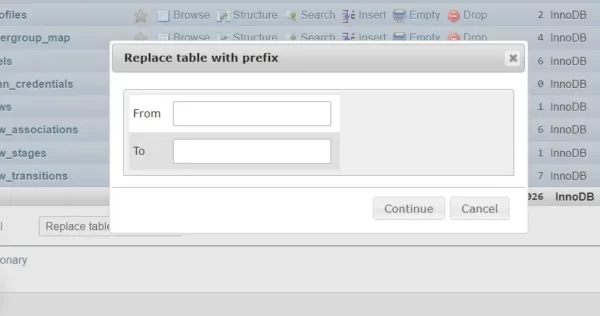
For example:
From: joom4_
To: x7k9m_
Review the affected tables carefully before confirming the operation.
Step 4: Update the Database Prefix in configuration.php
After the database tables have been renamed, update the database prefix in Joomla’s configuration.php file.
For example, if the existing value is:
public $dbprefix = 'joom4_';change it to:
public $dbprefix = 'x7k9m_';The value in configuration.php must match the prefix used by your database tables.
Save the file after making the change.
Step 5: Test Your Joomla Website
After changing the database prefix, open your Joomla website and test both the front end and Administrator area.
Check important areas such as:
- Homepage
- Joomla Administrator
- Articles
- Categories
- Menus
- Modules
- Users
- Media Manager
- Third-party extensions
- Contact forms and other website functionality
If the website displays a database error, stop and check whether the prefix in configuration.php exactly matches the database table prefix.
Before renaming database tables, make sure you understand the database-management tool provided by your hosting company. If you are using phpMyAdmin, refer to the official phpMyAdmin documentation for information about managing databases and tables.
What Happens If You Change Only configuration.php?
This is one of the most common and potentially serious mistakes when changing the Joomla database prefix.
Suppose your database currently contains:
abc12_content
abc12_users
abc12_extensions
If you change the Joomla configuration to:
x7k9m_without renaming the database tables, Joomla will try to access tables such as:
x7k9m_content
x7k9m_users
x7k9m_extensions
Those tables will not exist, so Joomla can no longer access the required database tables correctly.
Therefore, never change the configured prefix alone on an existing Joomla website.
Is Changing the Joomla Database Prefix a Security Requirement?
No. Changing the database prefix is not a replacement for proper Joomla security.
A less predictable prefix can make database table names less obvious, but it does not protect your website against vulnerabilities in Joomla, third-party extensions, weak passwords, compromised hosting accounts, or insecure server configurations.
For better Joomla security, keep your Joomla installation and extensions updated, use strong administrator credentials, limit unnecessary access, protect backups, use HTTPS, and monitor your website for suspicious activity.
Changing the database prefix should only be considered one small part of your overall Joomla security strategy. Joomla recommends keeping the core software and third-party extensions updated and maintaining a tested backup and recovery process. For more security recommendations, see the Joomla Security Checklist.
Important for Joomla Extension Developers
If you develop Joomla extensions, avoid hard-coding a specific database prefix in your SQL queries.
Joomla provides the #__ placeholder for database table names.
For example:
SELECT * FROM #__contentJoomla replaces #__ with the actual database prefix configured for the website.
This allows an extension to work with different Joomla database prefixes without requiring developers to know the prefix used by each website.
Common Mistakes When Changing the Joomla Database Prefix
Changing Only the configuration.php File
Changing only the $dbprefix value causes Joomla to look for tables that may not exist. The database tables and configuration must use the same prefix.
Changing Database Tables Without Updating Joomla
If you rename the database tables but leave the old prefix in configuration.php, Joomla will continue looking for the old table names.
Skipping the Backup
Never change database table names without a reliable backup. A database mistake can make your website unavailable.
Ignoring Third-Party Extensions
Most properly developed Joomla extensions should use Joomla’s database abstraction features rather than hard-coded table prefixes. However, older or poorly developed extensions may contain hard-coded table names. Test important third-party extensions after changing the prefix.
Changing the Prefix Directly on a Live Website
Whenever possible, test the process on a staging or local copy first. This gives you an opportunity to identify compatibility problems before affecting visitors to your production website.
Can I Change the Joomla Database Prefix Without phpMyAdmin?
Yes. phpMyAdmin is only one way to manage a Joomla database.
You can use another database-management application or a carefully prepared database migration process. However, you should only use a method that you understand, and that allows you to restore the database if something goes wrong.
For a production Joomla website, testing the complete process on a staging copy is strongly recommended.
Related: How to Install Joomla Quickstart Package on Server?
Frequently Asked Questions
What is the Joomla database prefix?
The Joomla database prefix is a short string placed at the beginning of Joomla database table names. It helps identify the tables belonging to a Joomla installation and allows different Joomla installations to use different table prefixes.
Where can I find the Joomla database prefix?
You can find the Joomla database prefix in Global Configuration, inside the configuration.php file, or by checking the names of the tables in the Joomla database.
Can I change the Joomla database prefix from Global Configuration?
You should not change the prefix in Global Configuration alone. The database tables must also be renamed to use the same new prefix. Otherwise, Joomla will not be able to find its database tables.
Is changing the Joomla database prefix necessary for security?
No. Changing the database prefix is not a complete security solution. Keeping Joomla and extensions updated, using strong passwords, securing your hosting account, and maintaining reliable backups are more important security practices.
Should I change the database prefix on an existing Joomla 6 website?
Not necessarily. If your Joomla 6 website is working correctly, changing the prefix simply for security reasons may introduce unnecessary risk. If you have a specific reason to change it, create a complete backup and test the process on a staging or local website first.
If you are changing the database prefix as part of a wider Joomla security review, it is worth checking your hosting environment, backups, extensions, and Joomla configuration as well. The Joomla Security Checklist for Joomla Setup provides additional recommendations for keeping a Joomla website secure.
Conclusion
The Joomla database prefix is used to identify the database tables belonging to your Joomla website. In Joomla 6, you can check the current prefix through Global Configuration, the configuration.php file, or your database management tool.
If you need to change the Joomla database prefix, remember that this is an advanced database operation. You must rename the appropriate database tables and update the Joomla configuration so that both use the same prefix.
Always create a complete backup before making database changes, and test the procedure on a staging or local copy whenever possible. For most existing Joomla 6 websites, changing the database prefix is not necessary unless you have a specific reason to do so.
Stay updated with our latest news, special offers, and exclusive updates directly in your inbox.